




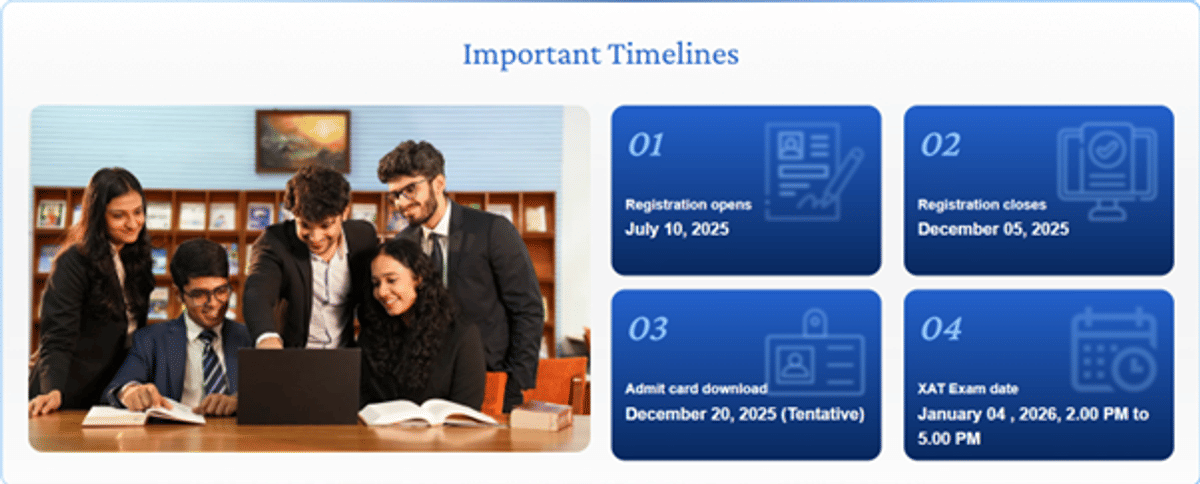
Going by the official timelines on the XLRI Jamshedpur website, the XAT 2026 Admit Card is likely to be available for download from 20 December 2025 onwards.
Candidates will be able to download the admit card using their XAT ID and Password from xatonline.in up to 4 January 2026.
- Candidates need to carry two printed copies of the admit card along with a valid photo for the XAT 2026 exam, scheduled on January 4, 2026.
- The XAT admit card contains details related to the candidates, such as name, registration number, photograph, etc., exam centre address, and some important instructions.
- Without this document, entry to the examination hall will not be allowed.

Source: XAT official Website
Chat with Experts & Aspirants, get exclusive insights: Join XAT Exam Community
Many are in a dilemma as to whether they should use mobile phones or laptops for downloading the admit card. This article will explain both alternatives for the guidance of candidates to enable them to make a judicious decision.
Also read:
- XAT 2026 registration updates, admit card details, and exam pattern.
- Download the complete XAT 2026 syllabus PDF and plan your preparation.
Mobile vs Laptop: Quick Comparison
For downloading your XAT 2026 admit card, a laptop is generally better for ease of viewing and printing, though a mobile also works well for the download. However, you must get a physical printout (two copies recommended) for exam day, so using a computer connected to a printer saves time and hassle, making the laptop the more practical choice for the final step
| Feature | Mobile Download | Laptop Download |
|---|---|---|
| Convenience | Download anywhere, anytime | Requires desk setup |
| Screen Size | 5-7 inches (smaller) | 13-17 inches (larger) |
| Verification | Difficult to spot errors | Easy to review details |
| Printing | Requires additional steps | Direct print option |
| Internet Stability | May face connectivity issues | Generally more stable |
| PDF Quality | Sometimes compressed | Full resolution |
Read More:
Ques. Can I download my XAT admit card only on mobile?
Ans. Yes, you can download your XAT 2026 admit card on your mobile. However, you must verify all details carefully and ensure proper printing quality before the exam day.
Ques. Is a laptop download better than a mobile for admit cards?
Ans. Laptop download is generally recommended because it offers better visibility for error checking, easier printing options, and more stable internet connectivity for downloading the PDF file.
Downloading XAT Admit Card on Laptop
Laptops remain the preferred choice for most candidates due to their larger screens and easier printing options.
| Aspect | Why Laptop is Better |
|---|---|
| Detail Verification | A larger screen shows the photograph clearly |
| Data Accuracy | Easy to spot spelling mistakes |
| Printing | One-click print to a connected printer |
| Storage | Better file management and backup |
| Form Filling | Keyboard input reduces errors |
Recommended Steps for Laptop Download
- Visit the official website xatonline.in
- Click on the admit card download link
- Log in using your XAT ID and date of birth
- Carefully review all printed information
- Check the photograph and signature clarity
- Save the PDF in multiple locations
- Print at least 2-3 copies as required
Also Read:
- Understand the XAT 2026 exam pattern, sections, and marking scheme.
- Check the XAT paper analysis to know the difficulty level and good attempts.
Ques. What if I don't have a laptop at home?
Ans. You can visit a nearby cyber café or library with computer facilities. Download your admit card there and take multiple printouts immediately for safety and backup purposes.
Ques. Can I forward the admit card from my mobile to my laptop?
Ans. Yes, download on mobile and email the PDF to yourself. Open the email on your laptop, download the admit card again, and print it for the best quality results.
Downloading XAT Admit Card on Mobile
Mobile phones offer convenience, especially for candidates who are travelling or don't have immediate access to a computer. Here's what you need to know:
Advantages of Mobile Download
- Access the admit card from anywhere with internet connectivity
- Quick download process using mobile browsers
- Can share the PDF instantly via WhatsApp or email
- Useful for emergency downloads on exam day
Challenges with Mobile Download
- The small screen makes it difficult to verify the photograph and signature quality
- Errors in personal details might go unnoticed
- Direct printing from a mobile can be complicated
- PDFs might not display properly on all mobile browsers
- Touch-based form filling can lead to input errors
Steps for Mobile Download
- Visit xatonline.in on your mobile browser
- Navigate to the admit card download section
- Enter your XAT ID and date of birth
- Verify your details on the small screen
- Download the PDF to your phone
- Transfer to a computer for printing or use a print app
Also Read:
- Proven XAT preparation tips to boost your score effectively.
- Compare the best online coaching options for XAT preparation.
Expert Recommendations
Education consultants and previous XAT toppers recommend downloading the admit card on a laptop whenever possible. The larger screen ensures you don't miss any errors that could cause problems at the exam centre.
However, if you're travelling or only have mobile access, download it on your phone, but make sure to:
- Zoom in to check your photograph
- Verify the spelling of your name
- Confirm exam centre address
- Transfer to the laptop before printing
Printing Considerations
Regardless of whether you download on a mobile or a laptop, printing quality matters significantly. Use a laser printer if possible, as inkjet prints may smudge. The admit card should be printed on A4-size paper with clear, readable text. Remember to carry two printed copies on exam day.
Ques. What print quality is required for the XAT admit card?
Ans. The admit card must be printed clearly on A4-size white paper. Your photograph should be visible, and all text must be readable without smudging or fading issues.
Ques. Should I print from my mobile or laptop?
Ans. Always print from a laptop for best results. If you downloaded it on a mobile, transfer the PDF file to a laptop or computer before printing to ensure proper formatting.
| XAT 2026 Mock Test, Attempt XAT Mock Test Online Free, Test Series and Papers PDF | ||
| XAT Mock Test 1 | XAT Mock Test 2 | XAT Mock Test 3 |
| XAT Mock Test 4 | XAT Mock Test 5 | XAT Mock Test 6 |
So to sum up, while mobile phones offer convenience for downloading the XAT 2026 admit card, laptops are the superior choice for this important task. The combination of a larger screen, an easier verification process, and direct printing capabilities makes laptops the recommended option for admit card downloads.
Candidates should ideally use both devices strategically: download on a laptop for printing, but keep a backup copy on a mobile for emergency access on exam day. This dual approach ensures you're prepared for any situation.
Remember, the admit card is your entry ticket to the exam hall. Don't let a small oversight on a mobile screen cost you your XAT 2026 opportunity.



Comments