



.png?h=35&w=35&mode=stretch)
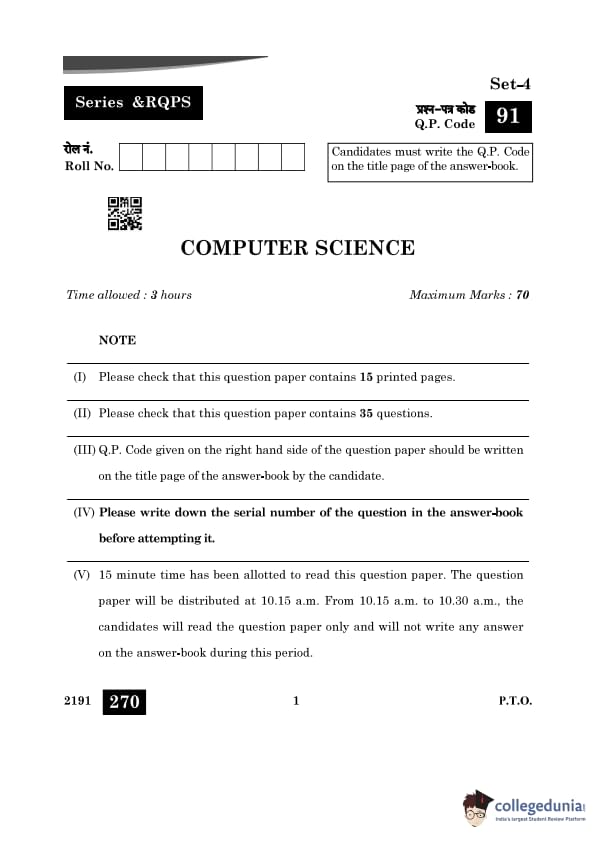
CBSE Class 12 Computer Science Question Paper 2024 PDF is available for download here. CBSE conducted the Computer Science exam on April 2, 2024 from 10:30 AM to 1:30 PM. The total marks for the theory paper are 70. The question paper will contain 20% MCQ-based questions, 40% competency-based questions, and 40% short and long answer type questions.
CBSE Class 12 Computer Science Question Paper 2024 with Answer Key
| CBSE Class 12 Computer Science Question Paper 2024 with Answer Key |  Download Download |
Check Solutions |
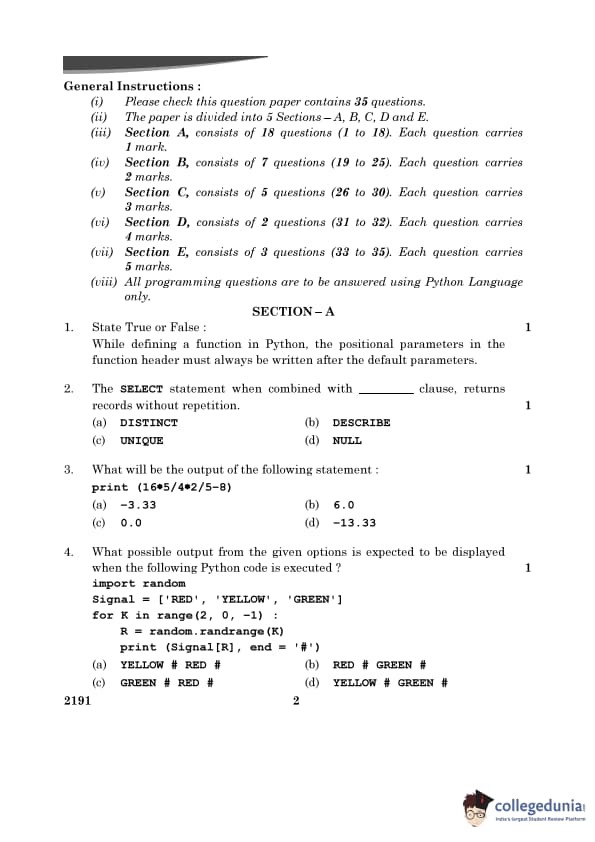
Question 1:
State True or False:
While defining a function in Python, the positional parameters in the function header must always be written after the default parameters.
View Solution
In Python, the positional parameters must always appear before the default parameters in the function definition. This is because Python relies on the position of arguments for mapping to function parameters. If default parameters were placed before positional ones, it would create ambiguity in argument mapping.
Question 2:
The SELECT statement when combined with ____ clause, returns records without repetition.
View Solution
The DISTINCT clause in SQL is used to ensure that the results of a query do not contain duplicate rows. It filters out duplicate records from the output and ensures that each row in the result set is unique.
Example:
SELECT DISTINCT column_name FROM table_name;This will return only unique values from the specified column. None of the other options (DESCRIBE, UNIQUE, or NULL) perform this functionality.
Question 3:
What will be the output of the following statement:
print(16*5/4*2/5-8)View Solution
The given expression evaluates step by step according to the precedence of arithmetic operators (division and multiplication from left to right, followed by subtraction):
16 * 5 = 80, 80 / 4 = 20, 20 * 2 = 40, 40 / 5 = 8, 8 - 8 = 0.0Therefore, the output of the statement is 0.0.
Question 4:
What possible output from the given options is expected to be displayed when the following Python code is executed?
import randomSignal = ['RED', 'YELLOW', 'GREEN']
for K in range(2, 0, -1):
R = random.randrange(K)
print(Signal[R], end='#')
View Solution
The code iterates over the range (2, 0, -1), which means K = 2 and K = 1. For each iteration:
- When K = 2: random.randrange(2) generates either 0 or 1. The output could be Signal[0] ('RED') or Signal[1] ('YELLOW').
- When K = 1: random.randrange(1) always generates 0. The output is Signal[0] ('RED').
One possible output is YELLOW # RED #, which matches option (a).
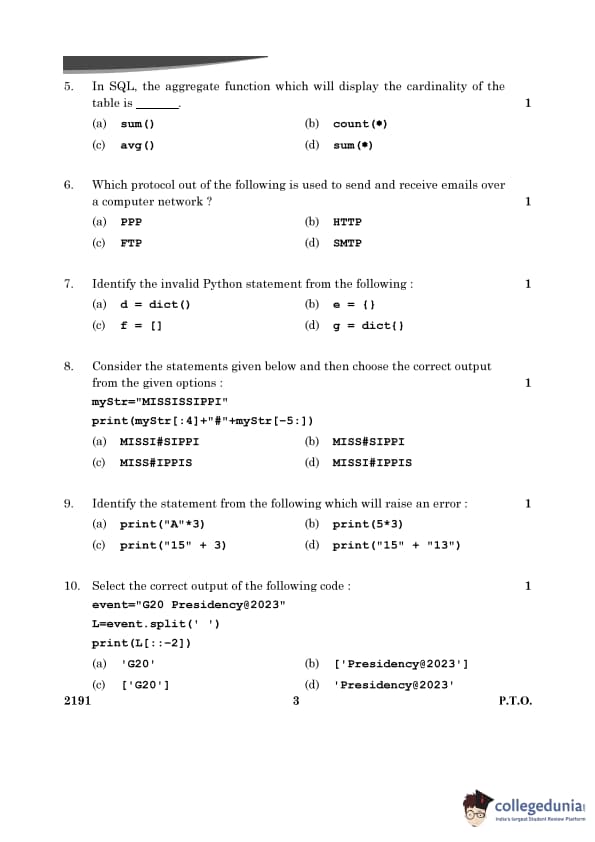
Question 5:
In SQL, the aggregate function which will display the cardinality of the table is ____.
View Solution
In SQL, the count(*) function is used to count the number of rows in a table, which effectively gives the cardinality of the table. Other functions like sum() and avg() are used for numerical aggregations, not for counting rows.
Question 6:
Which protocol out of the following is used to send and receive emails over a computer network?
View Solution
The SMTP (Simple Mail Transfer Protocol) is used to send emails, while receiving emails typically involves protocols like IMAP or POP3. The other options, such as FTP (File Transfer Protocol) and HTTP (Hypertext Transfer Protocol), are not related to email communication.
Question 7:
Identify the invalid Python statement from the following:
View Solution
The statement g = dict{} is invalid because the dict() function should not include curly braces {} as an argument. The correct way to initialize an empty dictionary is g = dict() or g = {}. All other options correctly initialize dictionaries or lists.
Question 8:
Consider the statements given below and then choose the correct output from the given options:
myStr = "MISSISSIPPI"print(myStr[:4] + "#" + myStr[-5:])
View Solution
The slicing operations in the given code work as follows:
- myStr[:4] extracts the first 4 characters, which are "MISS".
- myStr[-5:] extracts the last 5 characters, which are "SIPPI".
- These two substrings are concatenated with a "#" in between, resulting in "MISS#SIPPI".
Question 9:
Identify the statement from the following which will raise an error:
View Solution
In Python:
- Option (a): "A"*3 repeats the string "A" three times, resulting in "AAA".
- Option (b): 5*3 performs integer multiplication, resulting in 15.
- Option (d): "15" + "13" concatenates two strings, resulting in "1513".
- Option (c): "15" + 3 raises a TypeError because Python does not allow concatenation of a string ("15") and an integer (3).
Question 10:
Select the correct output of the following code:
event = "G20 Presidency@2023"L = event.split(' ')
print(L[::-2])
View Solution
The split() method divides the string "G20 Presidency@2023" into a list of substrings based on spaces, resulting in:
L = ["G20", "Presidency@2023"]The slicing operation L[::-2] works as follows:
- [::-2] reverses the list and selects every second element.
- Starting from the end, L[::-2] picks "G20".
Thus, the output is ['G20'].
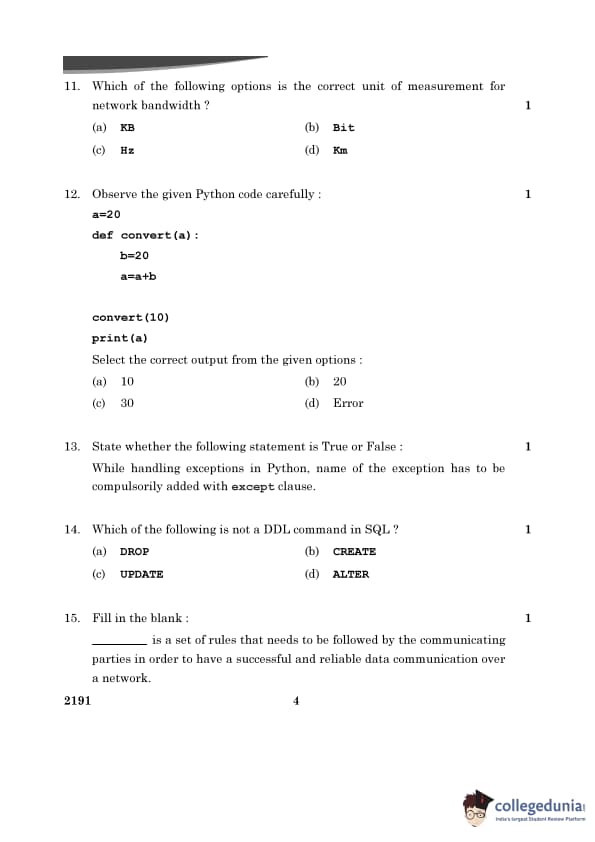
Question 11:
Which of the following options is the correct unit of measurement for network bandwidth?
View Solution
Network bandwidth is typically measured in terms of bits per second (e.g., Mbps or Gbps), which indicate the amount of data that can be transmitted per second. The other options, such as KB (kilobytes), Hz (frequency), and Km (distance), are unrelated to network bandwidth measurement.
Question 12:
Observe the given Python code carefully:
a = 20def convert(a):
b = 20
a = a + b
convert(10)
print(a)
Select the correct output from the given options:
View Solution
In Python, variables defined inside a function are local to that function and do not affect variables outside the function. Here, the variable a inside the function convert() is a local variable, and its value does not modify the global variable a. Therefore, the value of a printed outside the function remains 20.
Question 13:
State whether the following statement is True or False:
While handling exceptions in Python, the name of the exception has to be compulsorily added with except clause.
View Solution
In Python, the except clause can be used without specifying a particular exception. For example:
try: # some code except: # handle any exceptionHowever, it is a good practice to specify the exception type to make error handling more explicit and readable.
Question 14:
Which of the following is not a DDL command in SQL?
View Solution
UPDATE is a Data Manipulation Language (DML) command used to modify data in existing rows of a table. On the other hand, DROP, CREATE, and ALTER are Data Definition Language (DDL) commands, which are used to define and modify the structure of a database.
Question 15:
Fill in the blank:
________ is a set of rules that needs to be followed by the communicating parties in order to have a successful and reliable data communication over a network.
View Solution
A protocol is a set of rules that defines how data is transmitted and received over a network. It ensures that communication between devices is reliable and successful. Examples of protocols include HTTP, FTP, and SMTP.
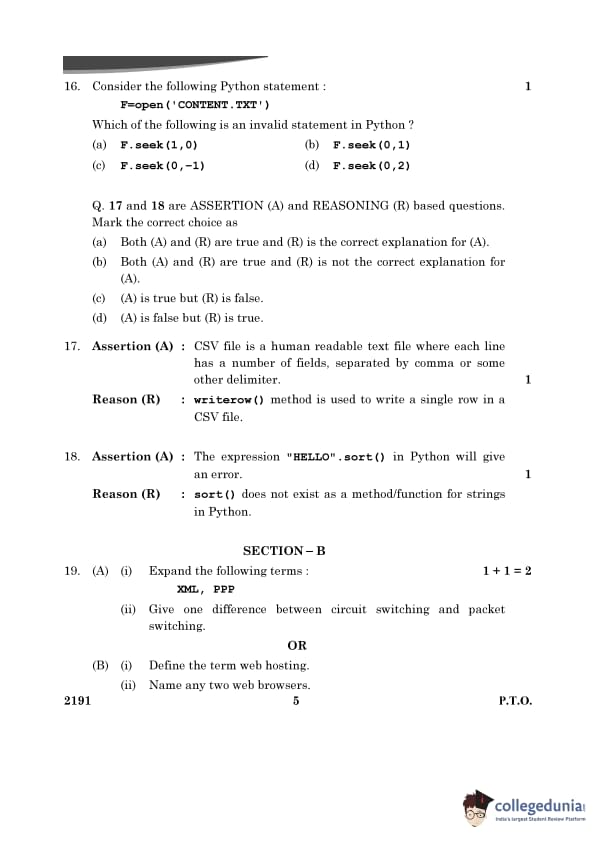
Question 16:
Consider the following Python statement:
F = open('CONTENT.TXT')Which of the following is an invalid statement in Python?
View Solution
The seek() method in Python is used to change the file’s current position. It takes two arguments: 1. offset: The position (in bytes) to move the file pointer to. 2. whence: The reference point for offset. Valid values for whence are:
- 0: Beginning of the file.
- 1: Current file position.
- 2: End of the file.
A value of -1 for whence is invalid, making F.seek(0, -1) incorrect.
Question 17:
Assertion (A): CSV file is a human-readable text file where each line has a number of fields, separated by a comma or some other delimiter.
Reason (R): writerow() method is used to write a single row in a CSV file.
Mark the correct choice:
View Solution
The writerow() method is not the reasoning behind the assertion that CSV files are human-readable text files with fields separated by commas. The assertion describes the structure and purpose of CSV files, while the reason describes a function related to working with CSV files. Thus, while both statements are true, the reason does not explain the assertion.
Question 18:
Assertion (A): The expression "HELLO".sort() in Python will give an error.
Reason (R): sort() does not exist as a method/function for strings in Python.
Mark the correct choice:
View Solution
The sort() method is not defined for string objects in Python. It is used for lists, not strings. Therefore, trying to use sort() on a string object like "HELLO" results in an AttributeError, making both the assertion and reasoning true, with (R) correctly explaining (A).
Section - B
Question 19:
(A)
- Expand the following terms:
XML, PPP - Give one difference between circuit switching and packet switching.
OR
(B)
- Define the term web hosting.
- Name any two web browsers.
View Solution
(A)
- XML: Extensible Markup Language
PPP: Point-to-Point Protocol - Difference:
| Circuit Switching | Packet Switching |
|---|---|
| A dedicated communication path is established between sender and receiver. | Data is divided into packets and transmitted individually over the network. |
| Suitable for real-time communication like voice calls. | Suitable for data communication like emails and file transfers. |
(B)
- Web Hosting: Web hosting is essential for deploying websites online. It provides a platform where website files, such as HTML, CSS, and JavaScript, are stored and managed, ensuring they are accessible to users 24/7.
- Examples of Web Browsers: Google Chrome, Mozilla Firefox.
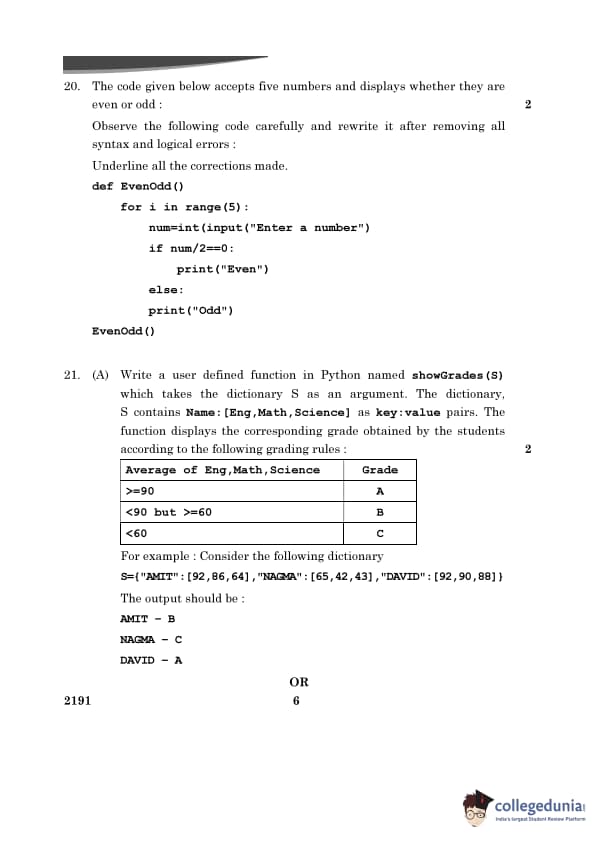
Question 20:
The code given below accepts five numbers and displays whether they are even or odd:
Observe the following code carefully and rewrite it after removing all syntax and logical errors. Underline all the corrections made.
Given Code:
def EvenOdd()for i in range(5):
num=int(input("Enter a number")
if num/2==0:
print("Even")
else:
print("Odd")
EvenOdd()
View Solution
def EvenOdd(): # Added colon at the function definitionfor i in range(5): # No change
num = int(input("Enter a number: ")) # Added a colon and closed the parenthesis
if num % 2 == 0: # Changed division '/' to modulus '%' for even check
print("Even") # No change
else:
print("Odd") # No change
EvenOdd() # No change
Corrections Made:
- Added a colon : after the function definition def EvenOdd().
- Fixed the missing colon in the input statement: input("Enter a number: ").
- Replaced the division operator / with the modulus operator % in the condition: if num % 2 == 0.
Question 21:
(A) Write a user-defined function in Python named showGrades(S) which takes the dictionary S as an argument.
The dictionary S contains Name: [Eng, Math, Science] as key:value pairs. The function displays the corresponding grade obtained by the students according to the following grading rules:
| Average of Eng, Math, Science | Grade |
|---|---|
| ≥ 90 | A |
| < 90 but ≥ 60 | B |
| < 60 | C |
Example:
S = {"AMIT": [92, 86, 64], "NAGMA": [65, 42, 43], "DAVID": [92, 90, 88]}Output:
AMIT - B NAGMA - C DAVID - AView Solution
def showGrades(S): for name, marks in S.items(): avg = sum(marks) / len(marks) if avg >= 90: grade = "A" elif avg >= 60: grade = "B" else: grade = "C" print(f"{name} - {grade}") S = {"AMIT": [92, 86, 64], "NAGMA": [65, 42, 43], "DAVID": [92, 90, 88]} showGrades(S)Explanation:
- The function showGrades(S) iterates through the dictionary S to compute the average and assign a grade based on the specified conditions.
- Grades are printed along with the student names.
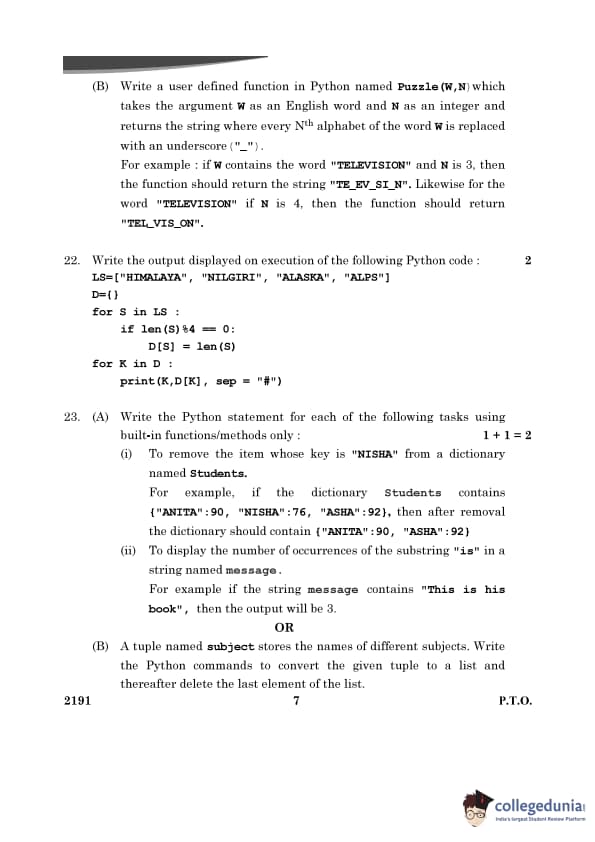
Question 22:
Write the output displayed on execution of the following Python code:
LS = ["HIMALAYA", "NILGIRI", "ALASKA", "ALPS"]D = {}
for S in LS:
if len(S) % 4 == 0:
D[S] = len(S)
for K in D:
print(K, D[K], sep = "#")
View Solution
Output: HIMALAYA#8 ALPS#4Explanation:
- The code checks if the length of each word in LS is divisible by 4.
- Only HIMALAYA and ALPS satisfy this condition, and they are added to the dictionary D.
- The dictionary keys and values are printed with a "#" separator.
Question 23:
(A) Write the Python statement for each of the following tasks using built-in functions/methods only:
- (i) To remove the item whose key is "NISHA" from a dictionary named Students.
- (ii) To display the number of occurrences of the substring "is" in a string named message.
View Solution
# (i) Remove the item with key "NISHA" Students.pop("NISHA", None) # (ii) Count the occurrences of "is" message.count("is")Explanation:
- The pop() method removes the item with the specified key from a dictionary.
- The count() method counts the number of occurrences of the specified substring in a string.
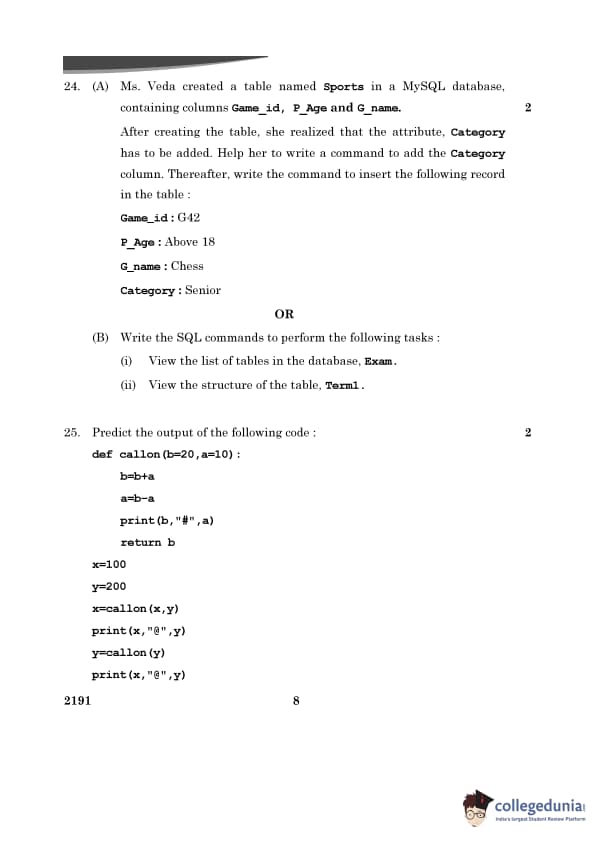
Question 24:
(A) Ms. Veda created a table named Sports in a MySQL database, containing columns Game_id, P_Age, and G_name.
After creating the table, she realized that the attribute Category has to be added. Help her to write a command to add the Category column. Thereafter, write the command to insert the following record in the table:
- Game_id: G42
- P_Age: Above 18
- G_name: Chess
- Category: Senior
View Solution
-- Step 1: Add the Category column to the table ALTER TABLE Sports ADD Category VARCHAR(20); -- Step 2: Insert the given record into the table INSERT INTO Sports (Game_id, P_Age, G_name, Category) VALUES ("G42", "Above 18", "Chess", "Senior");Explanation:
- The ALTER TABLE statement adds the new Category column to the Sports table.
- The INSERT INTO statement inserts the given record into the table.
(B) Write the SQL commands to perform the following tasks:
- (i) View the list of tables in the database Exam.
- (ii) View the structure of the table Term1.
View Solution
-- (i) View the list of tables in the database Exam SHOW TABLES; -- (ii) View the structure of the table Term1 DESCRIBE Term1;Explanation:
- The SHOW TABLES command lists all the tables in the currently selected database. Ensure that the database Exam is selected before executing this command using USE Exam.
- The DESCRIBE command displays the structure of the specified table Term1, including column names, data types, and constraints.
Question 25:
Predict the output of the following code:
	def callon(b=20, a=10):
		b = b + a
		a = b - a
		print(b, "#", a)
		return b

	x = 100
	y = 200
	x = callon(x, y)
	print(x, "@", y)
	y = callon(y)
	print(x, "@", y)
View Solution
Output: 300 # 100 300 @ 200 210 # 200 300 @ 210Explanation:
- The first function call updates x to 300 and prints 300 # 100.
- The second function call updates y to 210 and prints 210 # 200.
- The final print statements display the updated values of x and y.
Section - C
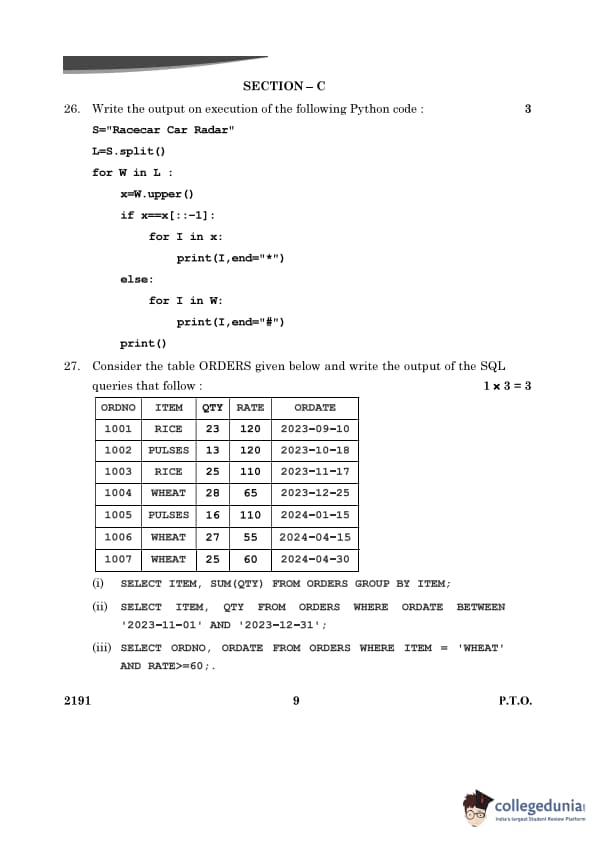
Question 26:
Write the output on execution of the following Python code:
	S = "Racecar Car Radar"
	L = S.split()
	for W in L:
		x = W.upper()
		if x == x[::-1]:
			for I in x:
				print(I, end="*")
		else:
			for I in W:
				print(I, end="#")
		print()
View Solution
Output: R*A*C*E*C*A*R* C#a#r# R*A*D*A*R*Explanation:
- The string S is split into words: ["Racecar", "Car", "Radar"].
- Each word is checked to see if it is a palindrome, and characters are printed with either "*" or "#" as separators.
Question 27:
Consider the table ORDERS given below and write the output of the SQL queries that follow:
| ORDNO | ITEM | QTY | RATE | ORDATE |
|---|---|---|---|---|
| 1001 | RICE | 23 | 120 | 2023-09-10 |
| 1002 | PULSES | 13 | 120 | 2023-10-18 |
| 1003 | RICE | 25 | 110 | 2023-11-17 |
| 1004 | WHEAT | 28 | 65 | 2023-12-25 |
| 1005 | PULSES | 16 | 110 | 2024-01-15 |
| 1006 | WHEAT | 27 | 55 | 2024-04-15 |
| 1007 | WHEAT | 25 | 60 | 2024-04-30 |
SQL Queries:
- (i) SELECT ITEM, SUM(QTY) FROM ORDERS GROUP BY ITEM;
- (ii) SELECT ITEM, QTY FROM ORDERS WHERE ORDATE BETWEEN '2023-11-01' AND '2023-12-31';
- (iii) SELECT ORDNO, ORDATE FROM ORDERS WHERE ITEM = 'WHEAT' AND RATE>=60;
View Solution
Query (i):
Output: ITEM SUM(QTY) RICE 48 PULSES 29 WHEAT 80Explanation:
- The GROUP BY clause groups the rows by the ITEM column.
- The SUM(QTY) function calculates the total quantity for each item.
Query (ii):
Output: ITEM QTY RICE 25 WHEAT 28Explanation:
- The WHERE clause filters rows with ORDATE between '2023-11-01' and '2023-12-31'.
- Only rows with ORDNO = 1003 (RICE) and ORDNO = 1004 (WHEAT) satisfy the condition.
Query (iii):
Output: ORDNO ORDATE 1004 2023-12-25 1007 2024-04-30Explanation:
- The WHERE clause filters rows where ITEM = 'WHEAT' and RATE >= 60.
- Only rows with ORDNO = 1004 and ORDNO = 1007 meet the condition.
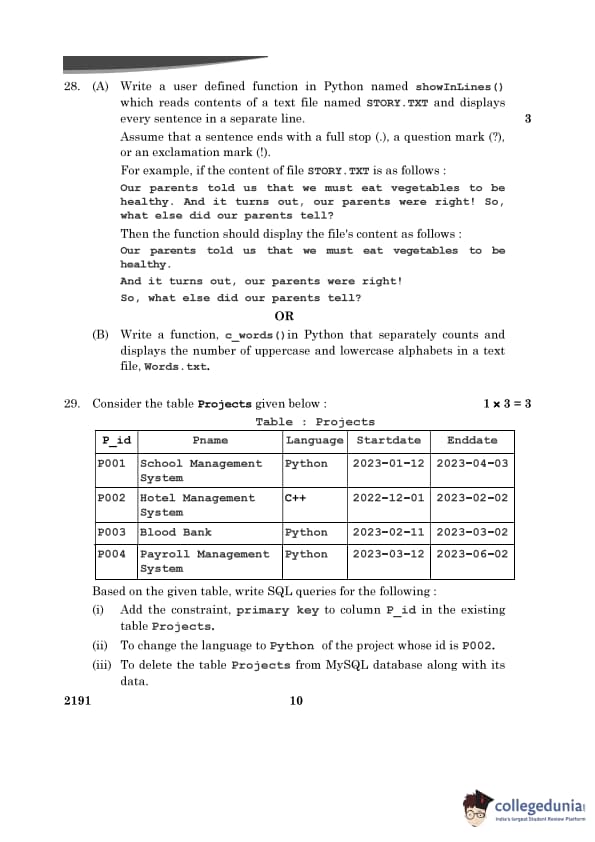
Question 28:
(A) Write a user-defined function in Python named showInLines() which reads contents of a text file named STORY.TXT and displays every sentence in a separate line.
Assume that a sentence ends with a full stop (.), a question mark (?), or an exclamation mark (!).
Example:
Content of STORY.TXT: Our parents told us that we must eat vegetables to be healthy. And it turns out, our parents were right! So, what else did our parents tell?Expected Output:
Our parents told us that we must eat vegetables to be healthy. And it turns out, our parents were right! So, what else did our parents tell?View Solution
	def showInLines():
		# Open the file STORY.TXT in read mode
		with open("STORY.TXT", "r") as file:
			content = file.read()  # Read the entire content of the file
		sentences = content.split('. ')  # Split by '. ' for sentences
		# Process further to handle '? ' and '! '
		final_sentences = []
		for sentence in sentences:
			sub_sentences = sentence.split('? ') if '?' in sentence else sentence.split('! ')
			final_sentences.extend(sub_sentences)
		# Print each sentence in a separate line
		for sentence in final_sentences:
			print(sentence.strip())  # Strip leading/trailing whitespaces
Explanation:
- The file STORY.TXT is opened in read mode, and its content is split by punctuation marks (. ? !).
- Each sentence is printed on a new line after stripping extra spaces.
(B) Write a function, c_words(), in Python that separately counts and displays the number of uppercase and lowercase alphabets in a text file, Words.txt.
View Solution
def c_words():
	def c_words():
		# Open the file Words.txt in read mode
		with open("Words.txt", "r") as file:
			content = file.read()  # Read the entire content of the file
		upper_count = 0  # Initialize uppercase count
		lower_count = 0  # Initialize lowercase count
		# Iterate through each character in the content
		for char in content:
			if char.isupper():  # Check for uppercase letters
				upper_count += 1
			elif char.islower():  # Check for lowercase letters
				lower_count += 1
		# Display the counts
		print(f"Uppercase letters: {upper_count}")
		print(f"Lowercase letters: {lower_count}")
Explanation:
- The file Words.txt is opened in read mode, and its content is read into a string.
- The function iterates through each character in the file.
- The isupper() method is used to check for uppercase letters, and the islower() method is used to check for lowercase letters.
- Counts of uppercase and lowercase letters are maintained in separate variables and displayed after iteration.
Question 29:
Consider the table Projects given below:
| P_id | Pname | Language | Startdate | Enddate |
|---|---|---|---|---|
| P001 | School Management System | Python | 2023-01-12 | 2023-04-03 |
| P002 | Hotel Management System | C++ | 2022-12-01 | 2023-02-02 |
| P003 | Blood Bank | Python | 2023-02-11 | 2023-03-02 |
| P004 | Payroll Management System | Python | 2023-03-12 | 2023-06-02 |
Write SQL queries for the following:
- (i) Add the primary key constraint to column P_id in the existing table Projects.
- (ii) Change the language to Python of the project whose ID is P002.
- (iii) Delete the table Projects from the MySQL database along with its data.
View Solution
Query (i):
ALTER TABLE Projects ADD PRIMARY KEY (P_id);Explanation:
- The ALTER TABLE statement adds the primary key constraint to the P_id column.
Query (ii):
UPDATE Projects SET Language = "Python" WHERE P_id = "P002";Explanation:
- The UPDATE statement modifies the Language column to "Python" for the project with P_id = "P002".
Query (iii):
DROP TABLE Projects;Explanation:
- The DROP TABLE statement deletes the Projects table and its data from the database.
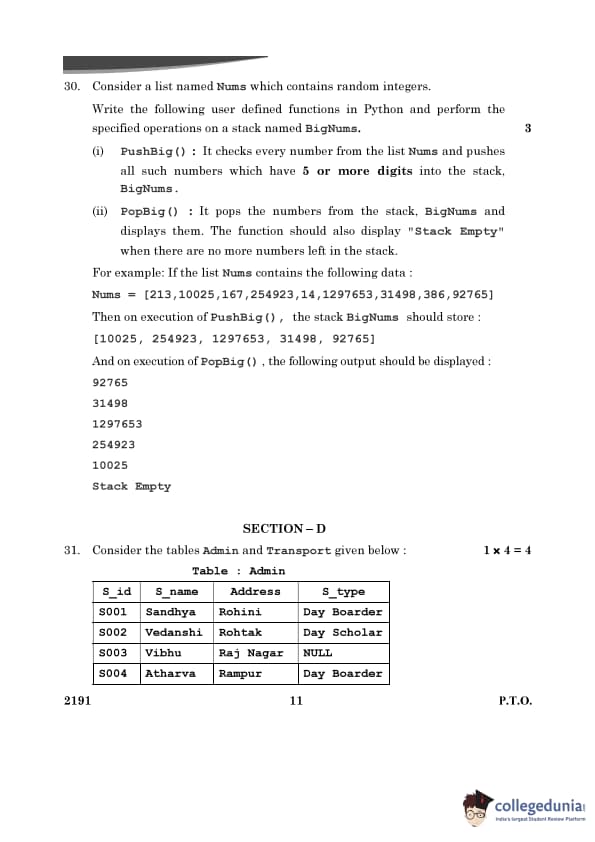
Question 30:
Consider a list named Nums which contains random integers.
Write the following user-defined functions in Python and perform the specified operations on a stack named BigNums:
- (i) PushBig(): It checks every number from the list Nums and pushes all such numbers which have 5 or more digits into the stack BigNums.
- (ii) PopBig(): It pops the numbers from the stack BigNums and displays them. The function should also display "Stack Empty" when there are no more numbers left in the stack.
Example:
Nums = [213, 10025, 167, 254923, 14, 1297653, 31498, 386, 92765]After executing PushBig(), the stack BigNums should store: [10025, 254923, 1297653, 31498, 92765]
After executing PopBig(), the following output should be displayed:
92765 31498 1297653 254923 10025 Stack EmptyView Solution
BigNums = []def PushBig():
global BigNums
Nums = [213, 10025, 167, 254923, 14, 1297653, 31498, 386, 92765]
for num in Nums:
if len(str(num)) >= 5:
BigNums.append(num)
def PopBig():
global BigNums
while BigNums:
print(BigNums.pop())
print("Stack Empty")
PushBig()
print("Stack after PushBig():", BigNums)
PopBig()
Explanation:
- The PushBig() function pushes numbers with 5 or more digits from the list Nums into the stack BigNums.
- The PopBig() function pops and displays the numbers in reverse order from the stack. When the stack is empty, it prints "Stack Empty".
Section - D
Question 31:
Consider the tables Admin and Transport given below:
Table: Admin
| S_id | S_name | Address | S_type |
|---|---|---|---|
| S001 | Sandhya | Rohini | Day Boarder |
| S002 | Vedanshi | Rohtak | Day Scholar |
| S003 | Vibhu | Raj Nagar | NULL |
| S004 | Atharva | Rampur | Day Boarder |
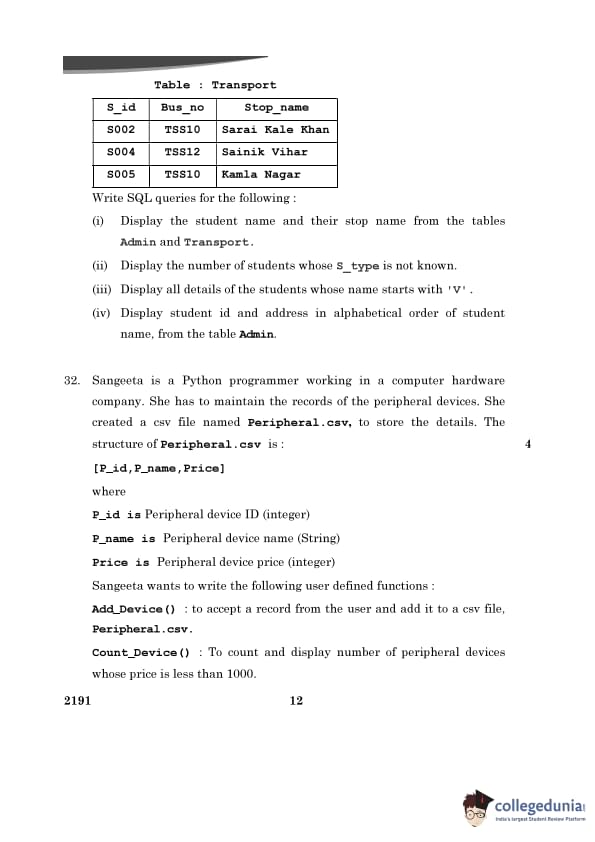
Table: Transport
| S_id | Bus_no | Stop_name |
|---|---|---|
| S002 | TSS10 | Sarai Kale Khan |
| S004 | TSS12 | Sainik Vihar |
| S005 | TSS10 | Kamla Nagar |
SQL Queries:
- (i) SELECT A.S_name, T.Stop_name FROM Admin A, Transport T WHERE A.S_id=T.S_id;
- (ii) SELECT COUNT(*) AS Unknown_S_type_Count FROM Admin WHERE S_type IS NULL;
- (iii) SELECT * FROM Admin WHERE S_name LIKE 'V%';
- (iv) SELECT S_id, Address FROM Admin ORDER BY S_name ASC;
View Solution
Query (i): Display the student name and their stop name from the tables Admin and Transport.
SELECT A.S_name, T.Stop_name FROM Admin A, Transport T WHERE A.S_id=T.S_id;Explanation:
- The INNER JOIN combines the tables Admin and Transport based on the common column S_id.
- The query retrieves the S_name from Admin and Stop_name from Transport.
Query (ii): Display the number of students whose S_type is not known.
SELECT COUNT(*) AS Unknown_S_type_Count FROM Admin WHERE S_type IS NULL;Explanation:
- The WHERE clause filters rows where S_type is NULL.
- The COUNT(*) function calculates the number of such rows.
Query (iii): Display all details of the students whose name starts with 'V'.
SELECT * FROM Admin WHERE S_name LIKE 'V%';Explanation:
- The LIKE operator checks for names that start with the letter 'V'.
- The % is a wildcard that matches any number of characters following 'V'.
Query (iv): Display student ID and address in alphabetical order of student name, from the table Admin.
SELECT S_id, Address FROM Admin ORDER BY S_name ASC;Explanation:
- The ORDER BY clause sorts the rows alphabetically based on the S_name column in ascending order (ASC).
- The query selects the S_id and Address columns for display.
Question 32:
Sangeeta is a Python programmer working in a computer hardware company. She has to maintain the records of the peripheral devices. She created a csv file named Peripheral.csv to store the details.
Structure of Peripheral.csv:
[P_id, P_name, Price]Functions:
- Add_Device(): To accept a record from the user and add it to the CSV file Peripheral.csv.
- Count_Device(): To count and display the number of peripheral devices whose price is less than 1000.
View Solution
import csv# Function to add a record to Peripheral.csv
def Add_Device():
# Open the file in append mode
with open("Peripheral.csv", "a", newline="") as file:
writer = csv.writer(file)
# Accept device details from the user
P_id = int(input("Enter Peripheral ID: "))
P_name = input("Enter Peripheral Name: ")
Price = int(input("Enter Price: "))
# Write the record to the CSV file
writer.writerow([P_id, P_name, Price])
print("Record added successfully.")
# Function to count devices with price < 1000
def Count_Device():
count = 0 # Initialize count
# Open the file in read mode
with open("Peripheral.csv", "r") as file:
reader = csv.reader(file)
for row in reader:
try:
# Check if price is less than 1000
if int(row[2]) < 1000:
count += 1
except ValueError:
pass # Skip header or invalid rows
print(f"Number of devices with price less than 1000: {count}")
# Example Usage
# Add_Device()
# Count_Device()
Explanation:
- The Add_Device() function:
- Opens the file Peripheral.csv in append mode.
- Accepts the details of the peripheral device (P_id, P_name, and Price) from the user.
- Writes the new record as a row in the CSV file using csv.writer.
- The Count_Device() function:
- Opens the file Peripheral.csv in read mode.
- Iterates through each row in the file and checks if the Price (third column) is less than 1000.
- Increments the count for each such device and displays the total count at the end.
Section - E
Question 33:
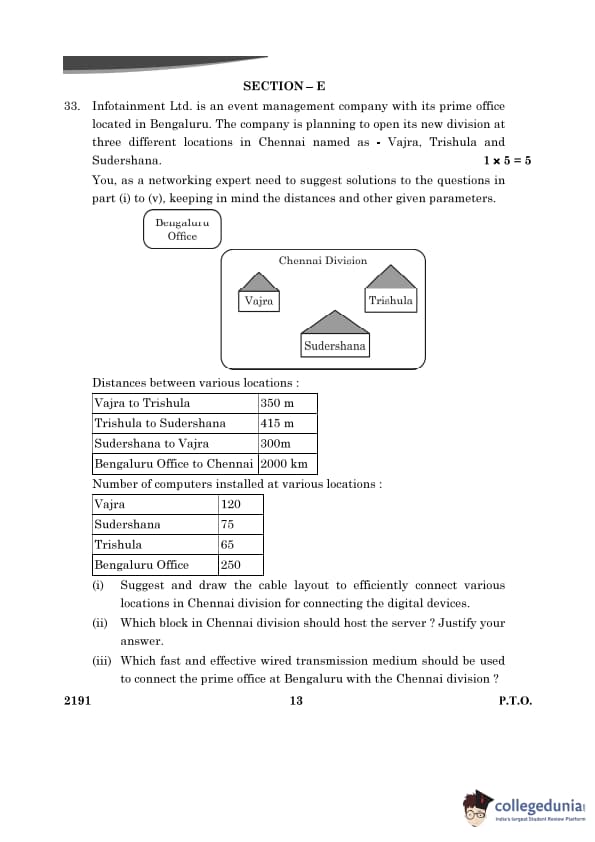
Infotainment Ltd. is an event management company with its prime office located in Bengaluru. The company is planning to open its new division at three different locations in Chennai named Vajra, Trishula, and Sudershana.
Distances between various locations:
| From - To | Distance |
|---|---|
| Vajra to Trishula | 350 m |
| Trishula to Sudershana | 415 m |
| Sudershana to Vajra | 300 m |
| Bengaluru Office to Chennai | 2000 km |
Number of computers installed at various locations:
| Location | Number of Computers |
|---|---|
| Vajra | 120 |
| Sudershana | 75 |
| Trishula | 65 |
| Bengaluru Office | 250 |
View Solution
- (i) Efficient cable layout: Use a triangular topology with connections between Vajra, Trishula, and Sudershana.
- (ii) Server hosting: Host the server at Vajra due to the highest number of computers (120).
- (iii) Transmission medium: Use optical fiber for the long-distance connection to Bengaluru office.
- (iv) Internal network device: Use a switch to connect devices within each location.
- (v) Device for data transmission: Use a repeater to mitigate signal degradation.
- Optical fiber supports high-speed data transfer over long distances with minimal data loss.
- A switch enables efficient communication between multiple devices in each location's local network.
- A repeater amplifies signals to avoid data loss during long-distance transmission.
Question 34:
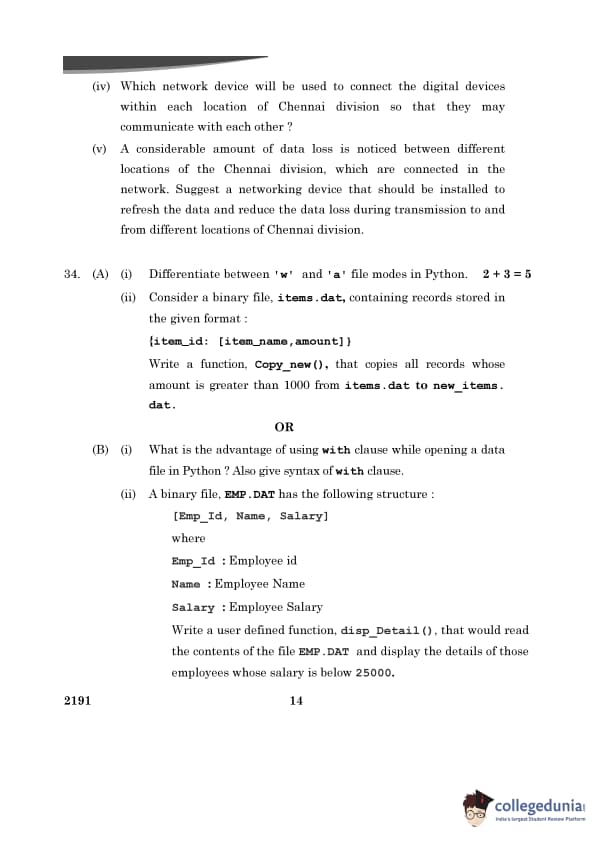
(A) (i) Differentiate between 'w' and 'a' file modes in Python.
View Solution
| File Mode | Description |
|---|---|
| 'w' | Opens the file for writing. If the file exists, its content is erased. |
| 'a' | Opens the file for appending. Data is added to the end of the file. |
(ii) Consider a binary file, items.dat, containing records stored in the given format:
{item_id: [item_name, amount]}Write a function, Copy_new(), that copies all records whose amount is greater than 1000 from items.dat to new_items.dat.
View Solution
import pickledef Copy_new():
# Open source file for reading
with open("items.dat", "rb") as source_file:
# Open destination file for writing
with open("new_items.dat", "wb") as dest_file:
try:
while True:
# Load record from source file
record = pickle.load(source_file)
# Check if amount > 1000
if record["amount"] > 1000:
# Write to destination file
pickle.dump(record, dest_file)
except EOFError:
pass # End of file reached
Explanation:
- The source file items.dat is opened in binary read mode ('rb'), and the destination file new_items.dat is opened in binary write mode ('wb').
- Each record is read using pickle.load() and checked for the condition amount > 1000.
- Records satisfying the condition are written to the destination file using pickle.dump().
B (i) What is the advantage of using with clause while opening a data file in Python? Also give syntax of with clause.
View Solution
- Advantage: The with clause automatically manages resources. It ensures that the file is properly closed after its suite finishes execution, even if an exception occurs.
Syntax:
with open("filename", "mode") as file:# Perform file operations
(ii) A binary file, EMP.DAT, has the following structure:
[Emp_Id, Name, Salary]Write a user-defined function, disp_Detail(), that would read the contents of the file EMP.DAT and display the details of those employees whose salary is below 25000.
View Solution
import pickledef disp_Detail():
# Open the binary file for reading
with open("EMP.DAT", "rb") as file:
try:
while True:
# Load a record from the file
record = pickle.load(file)
# Check if salary < 25000
if record[2] < 25000:
print(f"Emp_Id: {record[0]}, Name: {record[1]}, Salary: {record[2]}")
except EOFError:
pass # End of file reached
Explanation:
- The file EMP.DAT is opened in binary read mode ('rb').
- Each record is read using pickle.load() and checked for the condition Salary < 25000.
- Details of matching records are printed in the specified format.
Question 35:
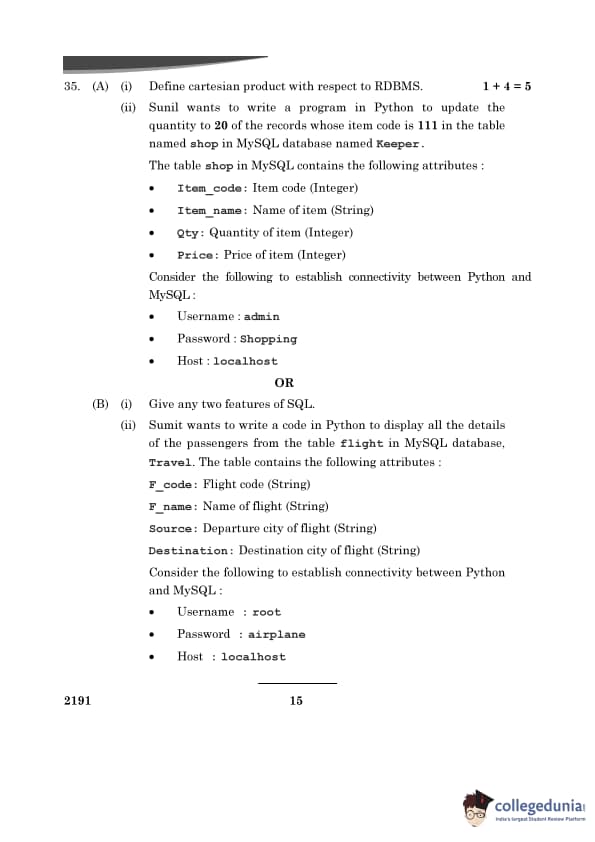
(A) (i) Define cartesian product with respect to RDBMS.
View Solution
The Cartesian product in RDBMS is a result of the CROSS JOIN operation between two tables. It combines every row of the first table with every row of the second table, resulting in all possible combinations of rows.
(ii) Write a program in Python to update the quantity to 20 of the records whose item code is 111 in the table named shop in the MySQL database named Keeper.
View Solution
import mysql.connectordef update_quantity():
try:
# Establish connection to the database
conn = mysql.connector.connect(
host="localhost",
user="admin",
password="Shopping",
database="Keeper"
)
cursor = conn.cursor()
# SQL query to update quantity
query = "UPDATE shop SET Qty = 20 WHERE Item_code = 111"
cursor.execute(query)
conn.commit() # Save changes to the database
print("Quantity updated successfully.")
except mysql.connector.Error as err:
print(f"Error: {err}")
finally:
cursor.close()
conn.close()
# Call the function
update_quantity()
Explanation:
- The connection is established using mysql.connector.connect() with the given credentials.
- The UPDATE statement modifies the Qty field for rows where Item_code = 111.
- conn.commit() saves the changes to the database.
- The connection is closed using cursor.close() and conn.close().
(B) (i) Give any two features of SQL.
View Solution
- SQL is used to perform CRUD operations: Create, Read, Update, and Delete data in a relational database.
- It supports functions like JOIN, GROUP BY, and ORDER BY to efficiently retrieve and manipulate data.
(ii) Sumit wants to write a code in Python to display all the details of the passengers from the table flight in MySQL database, Travel. The table contains the following attributes:
- F_code: Flight code (String)
- F_name: Name of flight (String)
- Source: Departure city of flight (String)
- Destination: Destination city of flight (String)
Consider the following to establish connectivity between Python and MySQL:
• Username : root
• Password : airplane
• Host : localhost
View Solution
import mysql.connectordef display_passengers():
try:
# Establish connection to the database
conn = mysql.connector.connect(
host="localhost",
user="root",
password="airplane",
database="Travel"
) cursor = conn.cursor()
# SQL query to fetch all records from flight table
query = "SELECT * FROM flight"
cursor.execute(query)
# Display records
print("F_code | F_name | Source | Destination")
for row in cursor.fetchall():
print(f"{row[0]} | {row[1]} | {row[2]} | {row[3]}")
except mysql.connector.Error as err:
print(f"Error: {err}")
finally:
cursor.close()
conn.close()
# Call the function
display_passengers()
Explanation:
- The connection is established using mysql.connector.connect() with the given credentials.
- The SELECT * FROM flight query fetches all rows and columns from the flight table.
- cursor.fetchall() retrieves all the results and prints them in a formatted manner.
- The connection is closed using cursor.close() and conn.close().




Comments