




CBSE Class 12 2024 Multimedia Question Paper with Answer Key pdf is available for download here. The exam was conducted by Central Board of Secondary Education on February 27, 2024. The question paper comprised a total of 21 questions divided among 2 sections.
CBSE Class 12 Multimedia Question Paper 2024 with Answer Key
| CBSE Class 12 2024 Multimedia Question Paper with Answer Key |  Download Download |
Check Solution |
CBSE Class 12 Multimedia Question Paper With Solutions
Question 1:
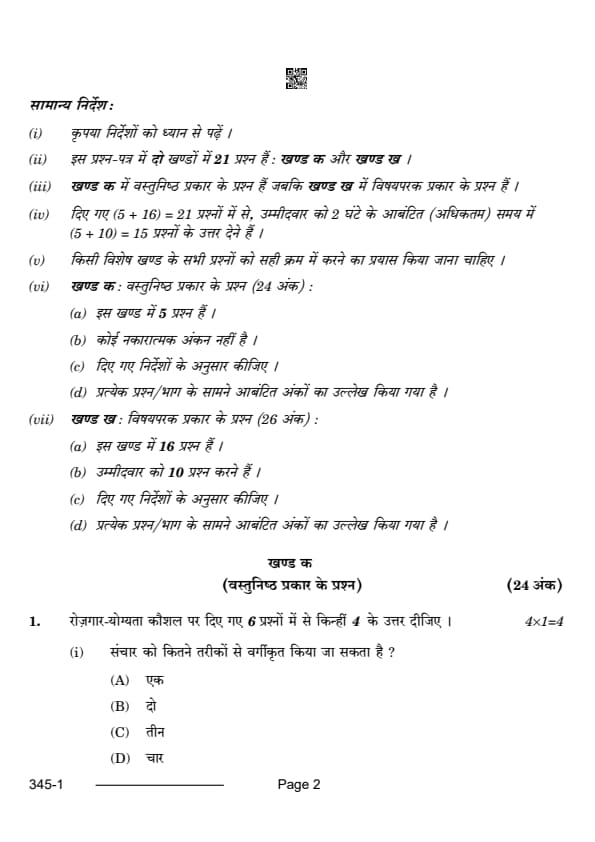
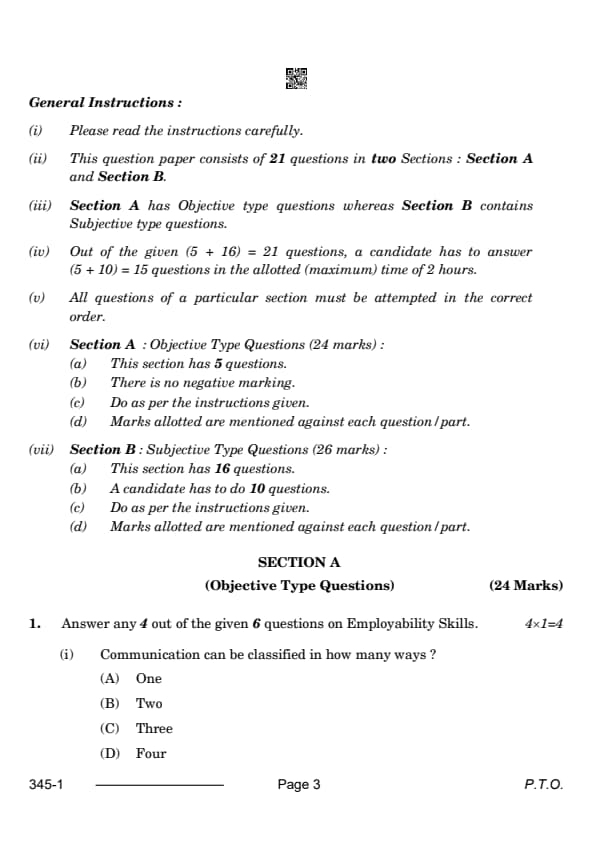
(i) Communication can be classified in how many ways?
View Solution
Understanding Communication Classification.
Communication can generally be classified into three main types:
1. Verbal Communication – The use of words and language, including both spoken and written forms.
2. Non-Verbal Communication – Involves gestures, body language, facial expressions, and tone of voice.
3. Visual Communication – The use of visual elements such as graphs, charts, and symbols to convey messages.
These classifications help in understanding how messages are transmitted and interpreted in various contexts. Quick Tip: Effective communication often involves a combination of these types to convey messages more clearly and accurately.
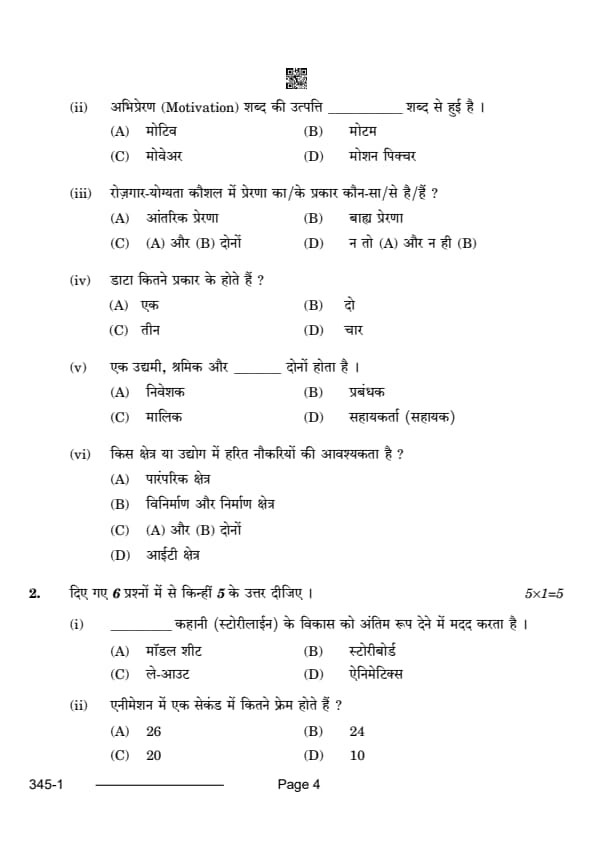
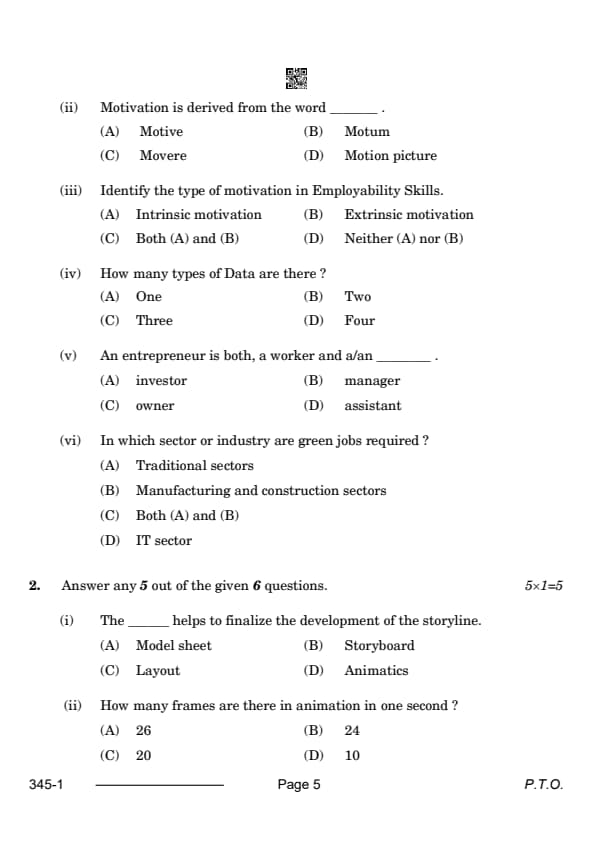
(ii) Motivation is derived from the word _____.
View Solution
Understanding Motivation.
The term "motivation" comes from the Latin word "movere," meaning "to move." It refers to the internal or external factors that influence an individual's actions, driving them to pursue goals or engage in certain behaviors. Quick Tip: Understanding the roots of motivation helps in grasping its influence on behavior and decision-making.
(iii) Identify the type of motivation in Employability Skills.
View Solution
Understanding Motivation Types in Employability Skills.
In employability skills, both intrinsic and extrinsic motivations play a role.
1. Intrinsic motivation refers to the inner desire to do something because it is enjoyable or personally fulfilling.
2. Extrinsic motivation is driven by external rewards such as pay, recognition, or job security.
A combination of both types is often seen in employability skills development. Quick Tip: Balancing intrinsic and extrinsic motivation can lead to more sustained job performance and job satisfaction.
(iv) How many types of Data are there?
View Solution
Understanding Types of Data.
Data is generally classified into three types:
1. Qualitative Data – Describes qualities or characteristics and is often non-numeric.
2. Quantitative Data – Represents numerical values and can be measured.
3. Categorical Data – Represents data that can be divided into categories or groups.
These types help to organize and analyze information more effectively. Quick Tip: Knowing the types of data can assist in choosing the right analysis methods.
(v) An entrepreneur is both, a worker and a/an _____.
View Solution
Understanding the Entrepreneurial Role.
An entrepreneur typically wears multiple hats, functioning as both a worker and the owner of their business. As an owner, they are responsible for the vision, decisions, and operations of the business. Quick Tip: Being an entrepreneur requires adaptability and the ability to juggle various roles simultaneously.
(vi) In which sector or industry are green jobs required?
View Solution
Understanding Green Jobs.
Green jobs are those that contribute to preserving or restoring the environment. These jobs exist across various sectors, including traditional industries and manufacturing or construction sectors, especially in areas focusing on sustainability, energy efficiency, and waste management. Quick Tip: Green jobs are becoming increasingly important in combating climate change and promoting sustainable development.
(i) The _____ helps to finalize the development of the storyline.
View Solution
Understanding the Storyboard.
The storyboard is a sequence of drawings or images that outlines the key scenes and visual aspects of a film or animation. It helps in visualizing the flow of the storyline, aiding in both the creative and technical processes of film production. Quick Tip: A well-planned storyboard ensures clarity in communication and smooth progression in production.
(ii) How many frames are there in animation in one second?
View Solution
Understanding Frames in Animation.
In traditional animation, the standard frame rate is 24 frames per second (FPS), meaning 24 individual frames are shown every second to create the illusion of movement. This is the standard for film and animation. Quick Tip: 24 FPS is widely used in cinema and animation for a smooth and natural viewing experience.
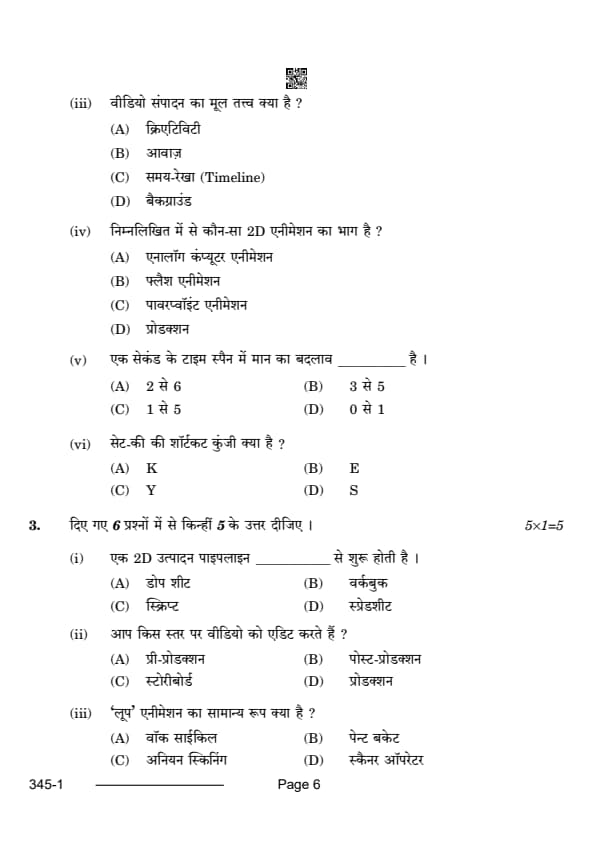
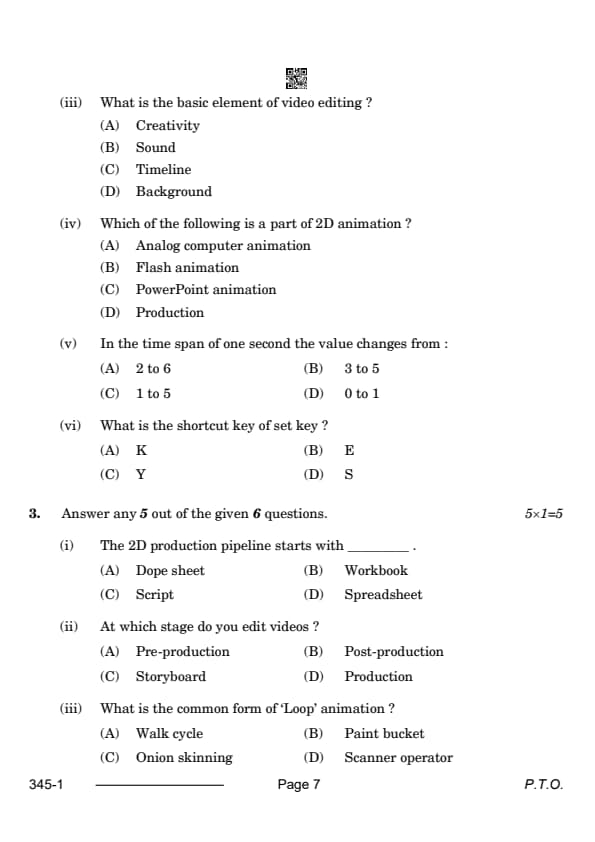
(iii) What is the basic element of video editing?
View Solution
Understanding the Timeline in Video Editing.
The timeline is the foundational tool in video editing, allowing editors to arrange, cut, and manipulate video and audio clips. It is where the story comes together, making it an essential element in the editing process. Quick Tip: Mastering the timeline ensures efficient video editing and better storytelling.
(iv) Which of the following is a part of 2D animation?
View Solution
Understanding 2D Animation.
Flash animation is a popular method of creating 2D animations, where characters and scenes are drawn digitally. It has been widely used for internet animations and multimedia projects due to its simplicity and efficiency. Quick Tip: Flash animation is easy to learn and can be used to create interactive animations.
(v) In the time span of one second the value changes from:
View Solution
Understanding Time Span in Animation.
In animation, one second typically corresponds to a value change from 0 to 1, which represents the completion of one full frame cycle in standard animation. This time span is crucial in syncing the action and ensuring smooth transitions in the animation process. Quick Tip: Understanding the timing of frames and transitions is critical for creating smooth and believable animations.
(vi) What is the shortcut key of set key?
View Solution
Understanding Set Key in Animation Software.
In most animation software, the "set key" function is used to mark keyframes in the timeline. The shortcut key "K" is commonly used to set a keyframe, which helps in defining critical points of movement or changes in the animation process. Quick Tip: Knowing shortcut keys speeds up the animation process and improves workflow efficiency.
(vii) The 2D production pipeline starts with _____.
View Solution
Understanding the 2D Production Pipeline.
The 2D animation production pipeline starts with the dope sheet, a document that helps break down the scenes, dialogue, and actions in an animation. It acts as a blueprint for animators and directors to visualize the timing and sequence of events. Quick Tip: The dope sheet is an essential tool for synchronizing the timing of animations with the soundtrack.
(vAt which stage do you edit videos?
View Solution
Understanding the Stages of Video Production.
Post-production is the stage where the editing of the video occurs. This includes adding visual effects, sound effects, music, and color grading to create the final version of the video. Quick Tip: Post-production is crucial for polishing the final product and ensuring the video matches the original vision.
What is the common form of ‘Loop’ animation?
View Solution
Understanding Loop Animation.
A walk cycle is a classic example of loop animation, where the same sequence of movements repeats to create the illusion of walking. This technique is used extensively in character animation. Quick Tip: The walk cycle is a fundamental animation technique used to give characters a fluid, continuous motion.
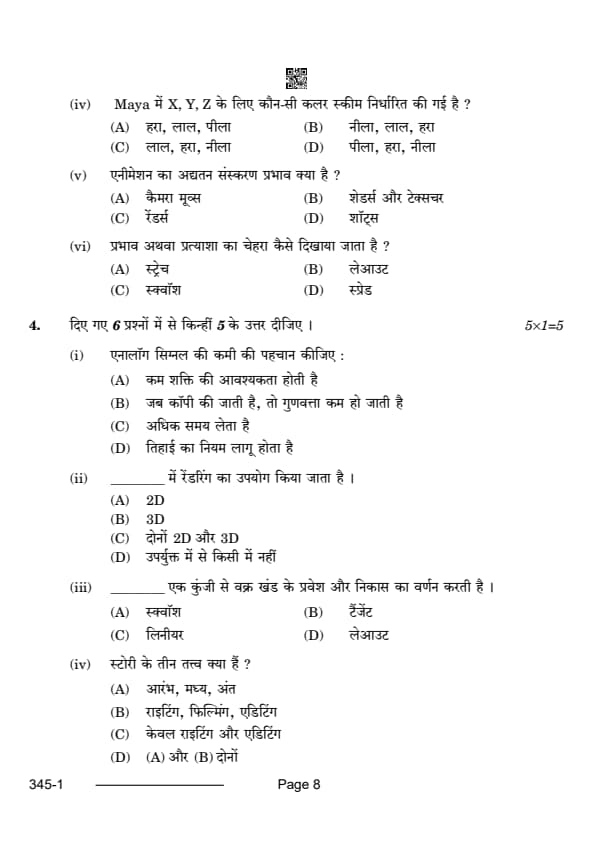
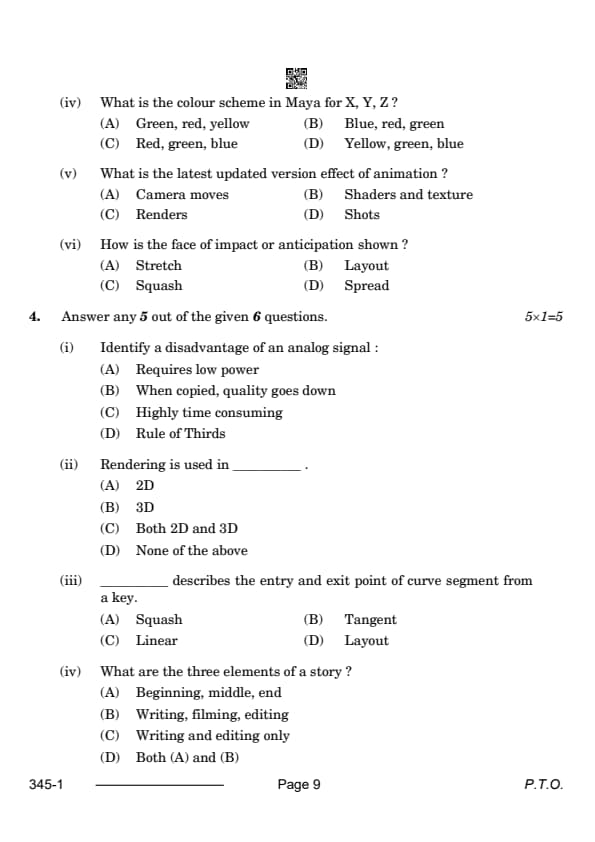
What is the colour scheme in Maya for X, Y, Z?
View Solution
Understanding the Color Scheme in Maya.
In Maya, the standard color scheme for 3D coordinates is Red for X, Green for Y, and Blue for Z. This color coding helps in distinguishing the three axes in the 3D space. Quick Tip: Color coding in Maya makes it easier to work with 3D models and align them along the correct axes.
What is the latest updated version effect of animation?
View Solution
Understanding Shaders and Texture Effects in Animation.
Shaders and texture effects are some of the most important elements in modern animation. These effects help in creating realistic surfaces, lighting, and shadows, making the animated scenes look more immersive and dynamic. Quick Tip: Shaders and textures enhance the visual appeal of an animation by simulating real-world material properties.
How is the face of impact or anticipation shown?
View Solution
Understanding Impact and Anticipation in Animation.
In animation, squash and stretch are used to convey the impact or anticipation of a motion. For example, when a character hits the ground, their face or body might "squash" to emphasize the force of the impact. Quick Tip: Squash and stretch are vital principles in animation to show the dynamics of motion and weight.
Identify a disadvantage of an analog signal:
View Solution
Understanding Analog Signals.
Analog signals degrade in quality when they are copied multiple times due to noise and distortion. This is a key disadvantage when compared to digital signals, which can be copied without quality loss. Quick Tip: To maintain signal quality, digital signals are preferred for long-term storage and transmission.
Rendering is used in _____ .
View Solution
Understanding Rendering.
Rendering is the process of generating a 2D image from a 3D model, but it can also be applied to 2D animation for adding effects or finishing touches. It is an essential step in both 2D and 3D animation pipelines. Quick Tip: Rendering in 3D animation often requires more computational power due to the complexity of lighting, textures, and shadows.
_____ describes the entry and exit point of curve segment from a key.
View Solution
Understanding Tangents in Animation.
A tangent describes the direction and rate at which a curve enters or exits a keyframe. It is crucial for controlling the smoothness and timing of movements in animation. Quick Tip: Adjusting tangents allows animators to create more fluid, natural transitions between keyframes.
What are the three elements of a story?
View Solution
Understanding Story Structure.
Every story typically follows a structure with a beginning, where the scene is set; a middle, where the plot develops; and an end, where the conflict is resolved. Quick Tip: A strong narrative requires a well-defined structure to engage the audience and deliver a satisfying conclusion.
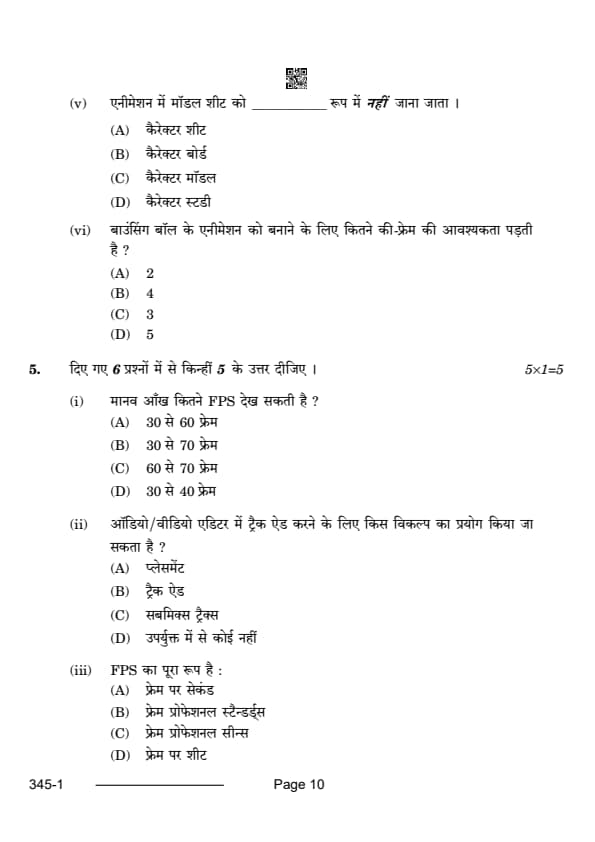
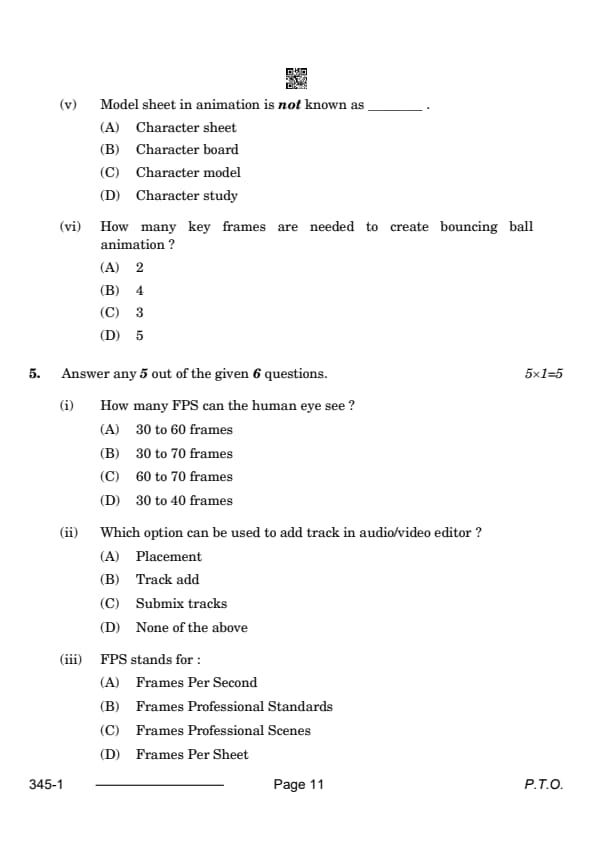
Model sheet in animation is not known as _____.
View Solution
Understanding Model Sheets in Animation.
A model sheet is a reference document for an animated character, showing multiple views and poses for consistency in character design. It is not referred to as a character model, which is a 3D representation of the character. Quick Tip: A model sheet is essential for maintaining visual consistency in character animation across different scenes.
How many key frames are needed to create bouncing ball animation?
View Solution
Understanding Key Frames in Animation.
For simple bouncing ball animation, three keyframes are typically needed: the start of the fall, the point of impact, and the ball bouncing back up. Additional frames are used for in-betweening, but these three keyframes define the motion. Quick Tip: In animation, the fewer the keyframes, the more the in-betweens are needed to smooth the motion.
(i) How many FPS can the human eye see?
View Solution
Understanding FPS and the Human Eye.
The human eye can perceive motion smoothly at around 30 to 60 FPS (frames per second). This is the typical range at which video and animations are displayed for smooth viewing. Quick Tip: Higher FPS rates can enhance the fluidity of motion, especially in fast-paced video games or high-definition films.
(ii) Which option can be used to add track in audio/video editor?
View Solution
Adding Tracks in an Audio/Video Editor.
In most audio and video editing software, Track add is the option used to insert a new track into the timeline for further editing and arrangement. Quick Tip: Adding separate tracks for audio and video allows for more precise editing and syncing.
(iii) FPS stands for:
View Solution
Understanding FPS.
FPS stands for Frames Per Second, which is the number of individual frames (images) displayed per second in a video or animation. It is crucial for determining the smoothness and quality of motion in digital media. Quick Tip: Higher FPS rates result in smoother visuals, especially important in high-action sequences or video games.
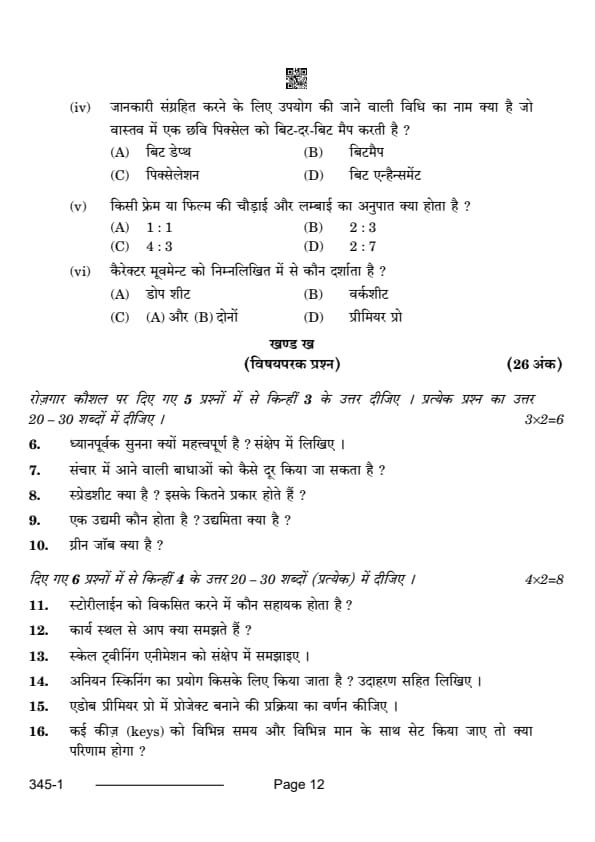
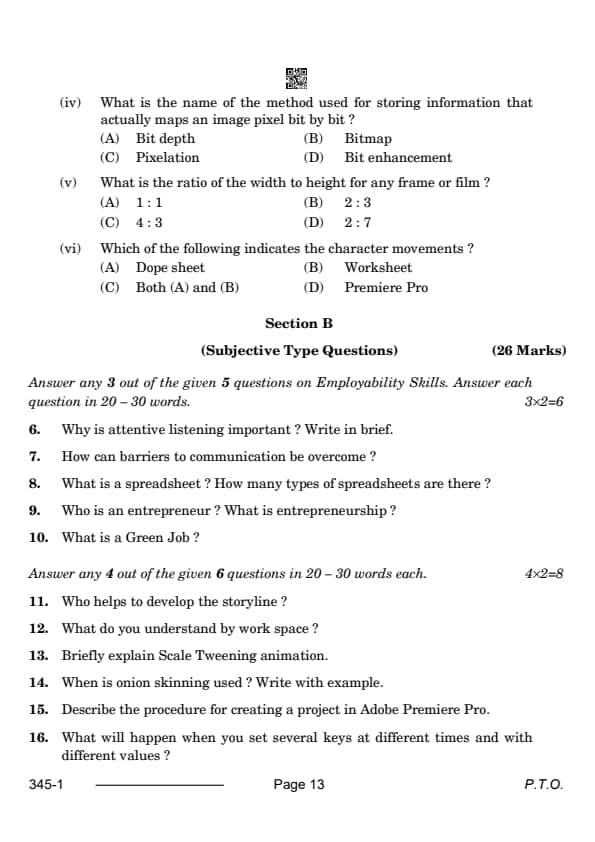
View Solution
Understanding Bitmap.
A bitmap is a method of storing image data where each pixel is mapped individually in a grid. Each pixel is represented by a bit or group of bits depending on the image's color depth. Quick Tip: Bitmaps are commonly used for digital images due to their ability to represent fine detail, but they can be large in file size.
(v) What is the ratio of the width to height for any frame or film?
View Solution
Understanding Frame Ratios.
The common aspect ratio for traditional film and video is 4 : 3, which means the width of the image is four parts for every three parts of height. This ratio is used for standard definition (SD) videos. Quick Tip: For widescreen formats, a 16 : 9 ratio is typically used, providing a broader, cinematic view.
(vi) Which of the following indicates the character movements?
View Solution
Understanding the Dope Sheet.
A dope sheet is used in animation to track the timing and movement of a character, marking the position of key frames. It’s a fundamental tool to ensure synchronized movements and actions. Quick Tip: The dope sheet provides a visual guide to animators for organizing key movements and actions across scenes.
Why is attentive listening important? Write in brief.
View Solution
Attentive listening is crucial for effective communication. It allows the listener to fully understand the message being conveyed, ensures active participation in the conversation, and helps to avoid misunderstandings. Active listening fosters empathy, builds trust, and enhances relationships. Quick Tip: Practicing attentive listening improves your ability to retain information and respond appropriately.
How can barriers to communication be overcome?
View Solution
Barriers to communication can be overcome by:
1. Improving listening skills: Actively listening ensures better understanding.
2. Clarifying messages: Ask for clarification or rephrase messages to avoid confusion.
3. Using simple language: Avoid jargon or complex language that may confuse the listener.
4. Addressing physical barriers: Ensure a quiet and comfortable environment for communication.
5. Building rapport: Establish trust and openness to facilitate smoother communication. Quick Tip: Clear communication is key to resolving misunderstandings and building positive relationships.
What is a spreadsheet? How many types of spreadsheets are there?
View Solution
A spreadsheet is a digital tool used for organizing, analyzing, and storing data in rows and columns. Spreadsheets allow users to perform calculations, visualize data through charts, and manage large sets of information.
There are two main types of spreadsheets:
1. Excel spreadsheets – Used for financial calculations, data analysis, and creating charts.
2. Google Sheets – A web-based spreadsheet tool that allows real-time collaboration. Quick Tip: Spreadsheets are powerful tools for data management and analysis, widely used in business, finance, and education.
Who is an entrepreneur? What is entrepreneurship?
View Solution
An entrepreneur is an individual who starts and operates a business, taking on financial risks in the hope of profit. Entrepreneurs often identify new market opportunities and bring innovative ideas to life.
Entrepreneurship refers to the process of identifying opportunities, creating a business to capitalize on them, and managing the risks associated with starting and growing a business. It involves creativity, innovation, and resource management. Quick Tip: Entrepreneurship is vital for economic growth, job creation, and fostering innovation.
What is a Green Job?
View Solution
A green job is a position that contributes to preserving or restoring the environment. These jobs focus on improving energy efficiency, reducing pollution, and promoting sustainable practices. Green jobs can be found in sectors such as renewable energy, environmental conservation, and sustainable agriculture. Quick Tip: Green jobs are essential for combating climate change and creating a more sustainable future.
Who helps to develop the storyline?
View Solution
The scriptwriter or storyteller is primarily responsible for developing the storyline. They create the plot, characters, and narrative structure, setting the direction for the entire project. Additionally, directors and producers collaborate to shape the storyline, ensuring it aligns with the project's vision and goals. Quick Tip: A strong storyline serves as the foundation for any project, be it film, animation, or other media.
What do you understand by workspace?
View Solution
A workspace refers to the environment or area where a person works, which includes the physical and digital tools they use. In the context of software like animation or video editing programs, the workspace includes the layout of tools, panels, and other resources that aid in the creation process. A well-organized workspace can increase productivity and focus. Quick Tip: Customizing your workspace to suit your workflow can make your tasks more efficient and enjoyable.
Briefly explain Scale Tweening animation.
View Solution
Scale Tweening animation is the process of animating the scaling of an object from one size to another over a specific period of time. This involves setting keyframes for the start and end sizes, and the animation software automatically generates the in-between frames. This technique is often used for zooming effects, growing/shrinking objects, and resizing animations. Quick Tip: Scale tweening adds dynamic movement to objects, making them appear to grow, shrink, or zoom during the animation.
When is onion skinning used? Write with example.
View Solution
Onion Skinning is a technique used in animation to see multiple frames at once. This allows animators to view the previous and next frames while working on the current one. It helps in maintaining fluidity and consistency in motion. For example, in traditional animation, onion skinning allows an animator to see the outlines of the previous and next keyframes to create smooth transitions between movements. Quick Tip: Onion skinning is particularly useful in frame-by-frame animation to ensure the movement appears natural.
Describe the procedure for creating a project in Adobe Premiere Pro.
View Solution
To create a project in Adobe Premiere Pro:
1. Open Premiere Pro and select "New Project" from the welcome screen.
2. Name your project and choose the location to save it.
3. Set up your sequence: Choose a preset based on your video resolution and frame rate, or customize it manually.
4. Import media: Go to "File" \(>\) "Import" to add video, audio, and other assets.
5. Start editing: Drag your media into the timeline, apply transitions, effects, and adjust audio levels.
6. Export the final project: When you finish editing, go to "File" \(>\) "Export" to output the video in your desired format. Quick Tip: Organizing your media in bins within Premiere Pro will save time and keep your project neat.
What will happen when you set several keys at different times and with different values?
View Solution
When you set several keys at different times with different values, the animation software will create a smooth transition between the keyframes. The values you set at each keyframe will determine the movement, scale, rotation, or other transformations of the object. The software will interpolate the in-between frames to create the desired motion, resulting in a fluid animation based on the keyframe positions and values. Quick Tip: Setting multiple keyframes enables complex movements and transformations, making your animation more dynamic.
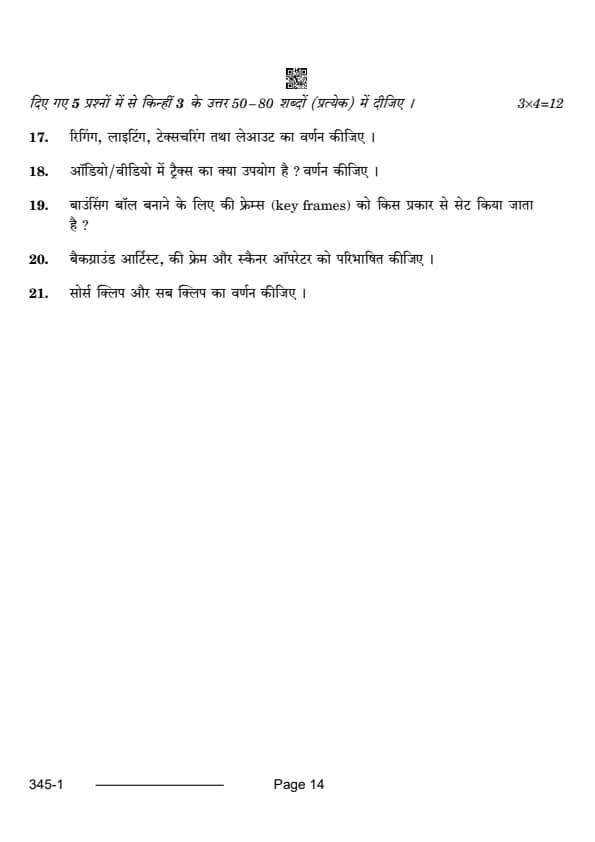
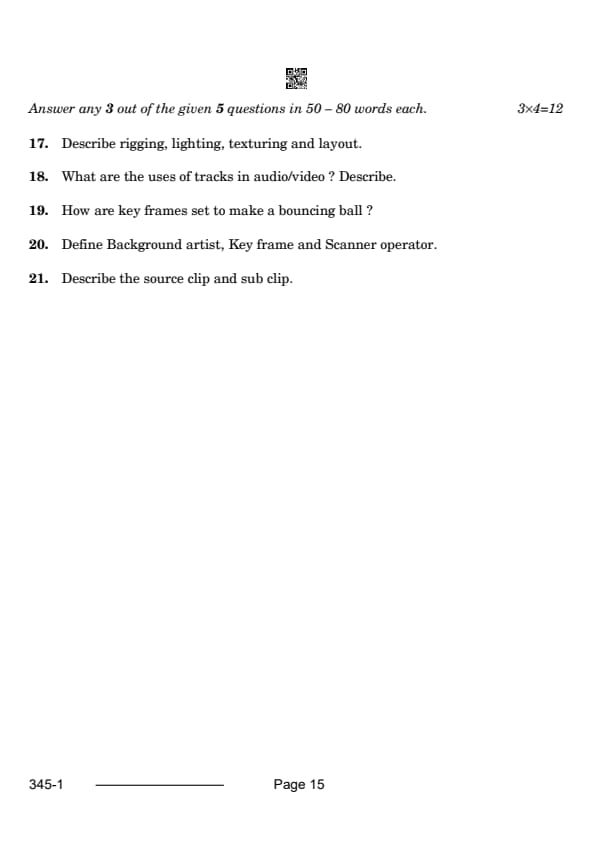
Describe rigging, lighting, texturing, and layout.
View Solution
- Rigging: The process of creating a skeletal structure for 3D models, allowing them to move and animate. The rig typically includes bones, joints, and control handles to manipulate the model.
- Lighting: The setup of lights in a 3D scene to illuminate the objects and set the mood. Lighting is crucial for creating shadows, highlights, and depth, and it enhances the visual storytelling.
- Texturing: The process of applying surfaces and details (like colors, patterns, and materials) to 3D models. Textures help add realism by providing detailed information about the surface of an object.
- Layout: The arrangement of elements within a 3D scene. This involves positioning characters, props, and backgrounds to create visually appealing compositions and ensure the flow of the animation. Quick Tip: Each of these processes—rigging, lighting, texturing, and layout—work together to bring a 3D animation to life, ensuring that the model moves correctly and appears realistic.
What are the uses of tracks in audio/video? Describe.
View Solution
In audio and video editing, tracks are used to organize and manage different types of media elements:
1. Audio Tracks: These tracks are used to add and manipulate sound elements such as dialogue, music, sound effects, and background noise.
2. Video Tracks: These tracks are used to layer and arrange video clips, including images, animations, and effects. Multiple video tracks can be used for overlays and transitions.
3. Submix Tracks: These tracks are used to combine several audio sources into a single output, making it easier to manage and apply effects to multiple audio layers at once.
Tracks help editors maintain a clear structure, making it easier to edit and fine-tune different elements of a project. Quick Tip: Proper use of tracks in audio and video editing ensures that each element remains organized and easier to modify.
How are key frames set to make a bouncing ball?
View Solution
To animate a bouncing ball, keyframes are set at the following stages:
1. First Keyframe: The ball starts at a specific height, representing its initial position.
2. Second Keyframe: The ball reaches the lowest point (the ground), where it will make contact. This keyframe represents the impact.
3. Third Keyframe: The ball bounces up to a reduced height, showing the energy loss after hitting the ground.
4. Subsequent Keyframes: Additional keyframes are added to show the ball continuing to bounce, with each bounce getting progressively smaller until it comes to rest.
The software automatically generates the in-between frames (tweens) to create a smooth animation between these keyframes. Quick Tip: Keyframes are the backbone of animation. Setting them properly ensures that the movement appears natural and fluid.
Define Background artist, Key frame, and Scanner operator.
View Solution
- Background Artist: A person responsible for designing and creating the static backgrounds or environments in animation. They set the visual tone and provide a stage for the characters' actions.
- Key Frame: The main frames in animation that define the start and end points of any movement or transformation. These keyframes dictate the overall flow and timing of the animation.
- Scanner Operator: A person who scans hand-drawn animation cells into digital form, allowing the animation to be processed in computer software for further editing and compositing. Quick Tip: Each role in animation, such as background artist or scanner operator, contributes to making a project visually compelling and technically sound.
Describe the source clip and sub clip.
View Solution
- Source Clip: The original video or audio file used in a project. It contains the raw footage or sound that is imported into the editing software for processing.
- Sub Clip: A portion of the source clip that has been isolated for use in the project. Sub clips allow editors to work with specific segments of the original clip without altering or re-importing the entire file.
Sub clips are especially useful for efficient editing and managing large files. Quick Tip: Using sub clips can save time and help you maintain a better workflow by focusing only on the relevant sections of your footage.



Comments