




The JEE Main 2026 admit card will be released 3-4 days prior to the test. Now is the time to recover your application ID or password in case you have forgotten.
NTA has a process through which candidates can obtain the JEE Main application ID and password on their official site. About 1.5 lakh students reclaim their credentials to download their JEE Main admit cards every year.
- If you forgot your application number or password, you can get it from the Recovery Application Number link on the official site.
- For this, you will need your registered email address and mobile number. Then, you can identify and reset your credentials.
It is now time to retrieve your login details. This will give you time to download your admit card. Additionally, it will help you avoid stress at the last minute.
This article shows how to retrieve your JEE Main ID and password in a step by step manner. You will also know what to do in case you cannot log in.
Also Read:
- Check the JEE Main admit card release date and direct link
- Common mistakes found in the JEE Main admit card and steps to correct them
Key Summary
- Checking registered email and SMS can help find the application number quickly.
- Students can recover the JEE Main ID or password through the official NTA portal.
- Application number recovery requires exact personal details entered during registration.
- Password reset is possible via security questions, OTP, or an email reset link.
- If the recovery fails, students should contact the NTA helpline for assistance.
Try This Before Using the Recovery Tool for Application Number.
There is an easier way to find your JEE Main ID. That is to check your own digital communication history. When you successfully register for the exam, NTA usually sends automated confirmations through email and registered mobile numbers.
- Go to the email account you used for registration. Search with keywords “JEE Main 2026”, “application number”, or “registration confirmation”. Check your spam folder as well.
- The application number is also sent to the registered mobile number. Check your message inbox for a text from NTA.
| Method | Search Keywords | What to look for? |
|---|---|---|
| Gmail/email | “Application number”, “JEE Main 2026”, “registration confirmation.” | NTA registration confirmation email |
| Mobile SMS | “NTA”, “Application” “JEE” | Text message with 12-digit ID |
| Files/Downloads | “JEE_Main_confirmation” | Application form in PDF |
Also Read: How to download JEE Main 2026 City Intimation Slip?
Steps to Recover Application Number for JEE Admit Card
NTA allows the application recovery through the NTA portal. You need to enter personal details like name, date of birth. This process is quick.
The official JEE Main candidate portal includes a “forgot application number” facility. Use the exact details you gave during registration for a match.
| Step | Action |
|---|---|
| 1 | Go to “https://jeemain.nta.nic.in/” |
| 2 | Click on “Candidate Login” or “JEE Main register and login.” |
| 3 | Select “Application Number” |
| 4 | Enter personal details.
|
| 5 | Enter the Captcha and submit |
| 6 | The application number will be sent to the registration number and email. |
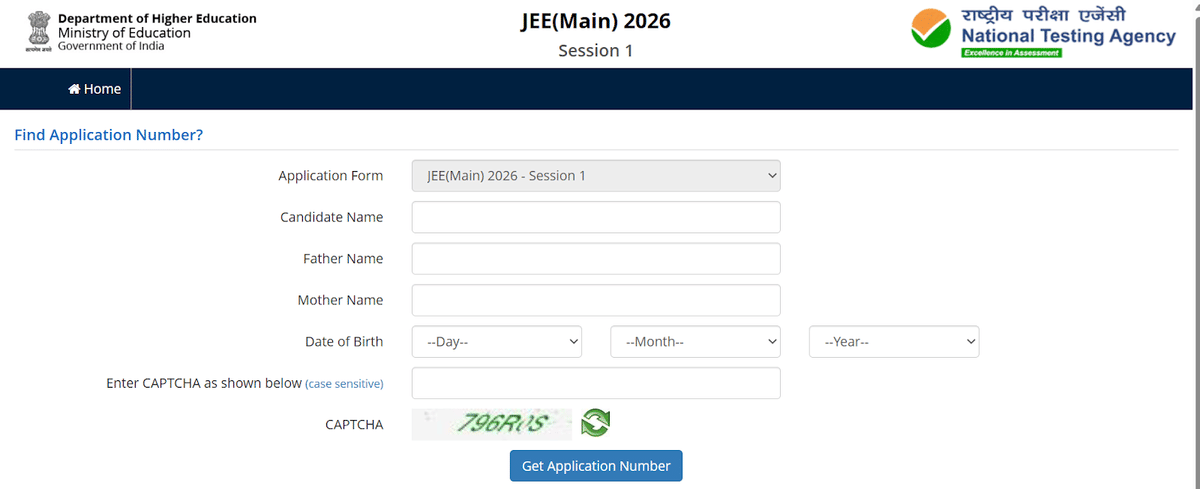
Source: JEE Main official website
Also Read: How many chapters are in JEE Main 2026?
Ques. How can I recover my JEE Main application number if it's showing “invalid application number”?
Ans. Use the forgot application option on https://jeemain.nta.nic.in/. With your personal details, retrieve your application ID.
How to Reset a Forgotten Password?
Forgetting a password is a more common problem while downloading the JEE Main admit card. You can reset the password in a few easy steps. NTA offers 3 methods to reset your password.
- Security question: Use the question and answer you selected during registration.
- Verification code: OTP will be sent to the Registered mobile number and registered email ID.
- Email reset link: A Specific link to reset your password will be sent to your email address.
| Recovery Option | Requirement | Process |
|---|---|---|
| Security Question | Answer to your chosen question | Instant reset on the website |
| OTP through SMS and email | Access to a registered mobile and email. | Enter OTP to set a new password |
| Email link to reset | Access to register email | Click the link in the email to reset |
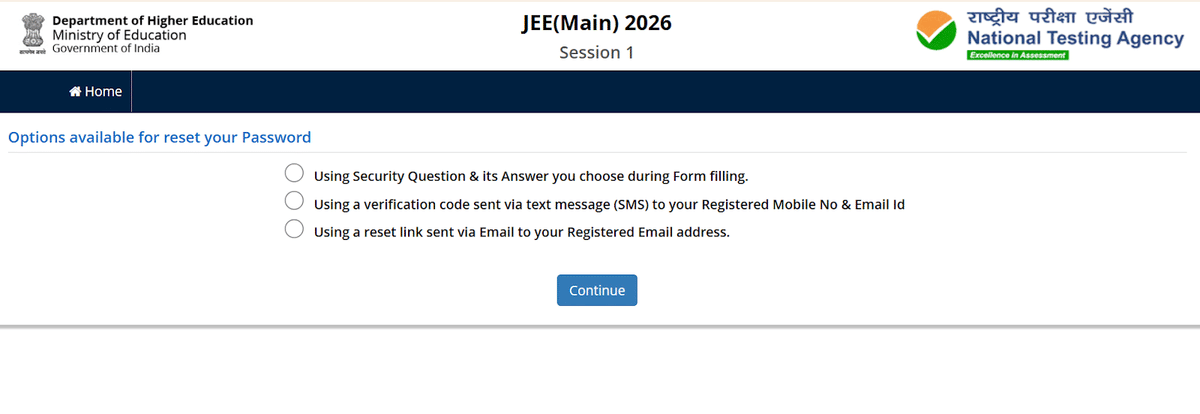
Source: JEE Main official website
Also Read: How Many Students Will Appear for JEE Main 2026?
Step-by-Step Process for Resetting Password
Here is the guide to resetting your password. 3 separate methods are available. Use it according to your preferences.
| Step | What to do? |
|---|---|
| Login Page | Choose forgot password option on the login page |
| Choosing a method to reset the password | Choose recovery options among 3:
|
| Security Question Steps |
|
| Verification Code Steps |
|
| Reset Link Steps |
|
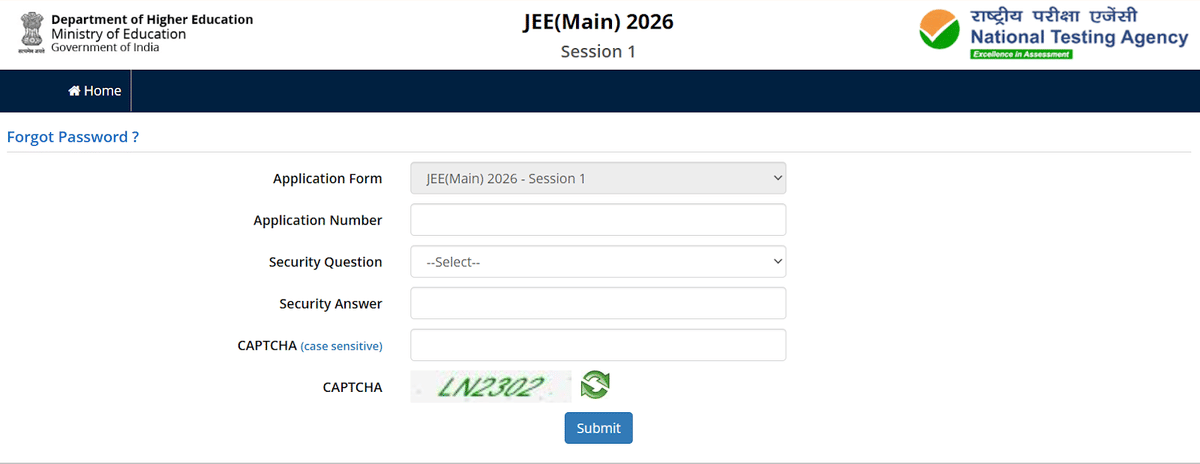
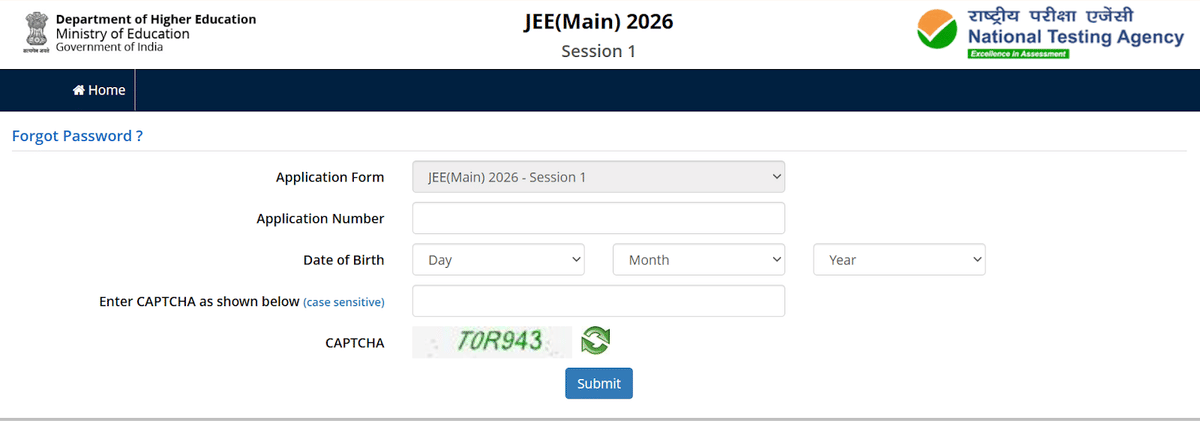
Source: JEE Main 2026 official website
Also Read: Last month’s revision tips for JEE Main 2026
Ques. I forgot my JEE Main password. How do I get my admit card?
Ans. Click forgot password on the JEE Main official website. Choose the option to reset via OTP or security question.
Ques. If I click on the forgot password. Will I be able to retrieve my old password? Or should I create a new one?
Ans. You will not be able to retrieve your old password. NTA directs you to create a new password.
Common Problems and Solutions When Recovering ID and Password for JEE Main Admit Card
It is very common to come across problems while recovering the application ID and password. The most common problems are technical website issues and not receiving the OTP. These issues are usually temporary. Always try again and use another browser.
| Problem | Solution |
|---|---|
| The website is not loading | Wait and try later. The site may be under maintenance. |
| Wrong details entered | Double-check name, date of birth. Use exact details while registering |
| No email/SMS received |
|
| Captcha issue | Refresh the page and clear the cache. |
| Multiple attempts failed | Contact NTA helpline |
| Browser compatibility | Use Chrome or Firefox for the best results |
Check JEE Main 2026 Exam Centres
Ques. Why am I getting an invalid password error for the JEE Main result? What should I do?
Ans. Double-check your password or application ID. If you still face the same issue, reset the password.
You should have your login details before NTA releases the Admit Card. If you have all the details, then you can easily download your admit card. By following the above-mentioned process, you can recover them easily. Make sure to keep your information handy while trying to recover your credentials.



Comments