




The NEET Admit Card 2026 will be released approximately 3-7 days before the exam on May 3, 2026. You will be able to download your NEET 2026 admit card from the official website neet.nta.nic.in. The NTA portal isn’t just for logging in; it’s your main page for the entire NEET journey. Now, the NEET Admit Card 2026 login portal might have issues like:
- Unable to log in due to high traffic during peak hours
- Unable to log in due to a weak or interrupted network connection
- Unable to log in due to browser issues or website downtime
- Forgot application number or password
- Registered mobile number or email is not accessible
- The captcha provided while logging in is not working
Do not worry, as these NEET 2026 Admit Card Login Issues can be easily fixed. For technical issues or wrong details, you can email neetug2026@nta.ac.in or call NTA at 011-40759000. The NEET Admit Card 2026 login portal is the control centre of your NEET application journey.
Also Check:
- NEET 2026 Admit Card Errors: Types of Errors, How to Fix it and Guidelines
- NTA Introduces Instagram, Facebook Handles for Real-Time JEE, NEET, CUET Updates
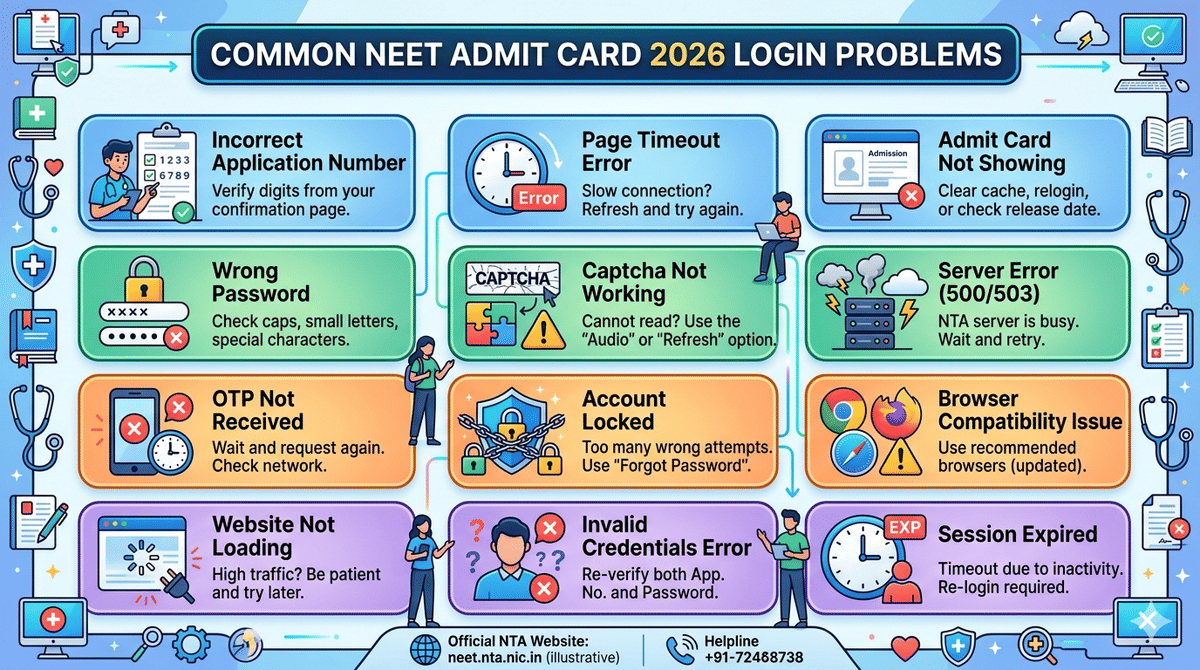
NEET Admit Card 2026 Login Problems and Solution
We have listed the NEET Admit Card 2026 login problems, their causes and how to fix them in the table below.
| Problem | Possible Cause | Solution |
|---|---|---|
| Incorrect Application Number | Typo or wrong number entered | Re-check confirmation email/SMS or use the “Forgot Application Number” option |
| Wrong Password | Entering an incorrect or case-sensitive password | Use “Forgot Password” to reset via OTP/email |
| OTP Not Received | Network issues or wrong mobile/email | Wait for a few minutes, check your spam folder, or request OTP again |
| Website Not Loading | Heavy traffic on the admit card release day | Try during non-peak hours or use a different browser/device |
| Page Timeout Error | Slow internet or server overload | Refresh the page or switch to a stable internet connection |
| Captcha Not Working | Browser compatibility or cache issues | Refresh the captcha, clear the browser cache, or switch browser |
| Account Locked | Multiple incorrect login attempts | Wait for some time or reset your password to unlock |
| Invalid Credentials Error | Mixing up login details (DOB/password) | Ensure correct format (DD/MM/YYYY for DOB if required) |
| Admit Card Not Showing | Not yet released or an incomplete application | Check the official announcement or application status |
| Server Error (500/503) | Temporary server issue | Retry after some time; avoid continuous refresh |
| Browser Compatibility Issue | Using an outdated browser | Update your browser or switch to Chrome/Edge |
| Session Expired | Inactivity during the login session | Log in again and complete the process quickly |
Also Read:
- NEET 2026 Aadhaar eKYC: NEET 2026 Application New Rules Update
- NEET UG Not Mandatory for BPT & BOT Admission 2026–27; Requirement Deferred to 2027–28
Common NEET Admit Card Login Issues and How to Fix Them
Some of the most common errors or technical glitches faced during NEET Admit Card login are provided below:
- Forgot application number or password: This is one of the most common problems. The NEET 2026 application number will be needed for future correspondence and later logins. You must keep the application number handy.
- Wrong password: Sometimes students type the password incorrectly because of uppercase/lowercase letters or special characters. Proofread and check before entering the password.
- Registered mobile number or email not accessible: Password reset depends on the registered mobile number or email. If you no longer have access to them, recovery becomes harder. Try to change the number by contacting the authorities.
NEET Admit Card Login Errors: Realtime Student Reviews
We have seen students facing issues while downloading the NEET Admit cards. Some of the realtime examples of students facing login issues are provided here.
Students ask: Why is my NEET form showing 'session expired' whenever I log in it?
To this, a Quora user “Dr. Apurv Khandelwal“ answered: Hey! It's because of security reasons… The site won't let you log in for more than a specific amount of time. So after a specific time you'll be automatically logged out.
Students also reported issues such as: My NEET admit card and Aadhaar card address do not match.
To this, Yogesh Kumar answered: Take a backup identification like a class 12 registration card or any other government-issued ID proof
What Should You Do If You face NEET Admit Card 2026 Login issues?
If you're having trouble downloading your NEET Admit Card 2026, don’t worry; this is a common issue. Some of the common issues and how you can solve them are:
- Clear Your Browser Cache and Cookies: Sometimes, clearing your browser’s cache and cookies can fix the issue.
- Try a Different Browser or Device: If it's not working on one browser, try switching to another browser or even a different device.
- Check Your Internet Connection: A weak or interrupted internet connection can prevent the download. Ensure your connection is stable.
- Log In During Off-Peak Hours: Try logging in during early morning or late night when there is less traffic on the website.
If none of these work, you can contact the NTA helpdesk at neet@nta.ac.in for further assistance.
Also Check:
- NEET Exam Day Guidelines: Check NEET Exam Dates, Timings, Documents to Carry, Dress Code, Do’s and Dont’s
- NEET 2026 Dress Code: Rules, Banned Items, Guidelines & Exam Day Tips
What are the Login Credentials Required for NEET 2026?
To access the NEET UG 2026 portal, you will need:
- Application Number
- Password
The candidate portal and Information Bulletin both confirm that these are the main login credentials for already registered candidates.
Check: NEET Exam Centres 2026(Out): Check State-wise List, City intimation slip & International centres
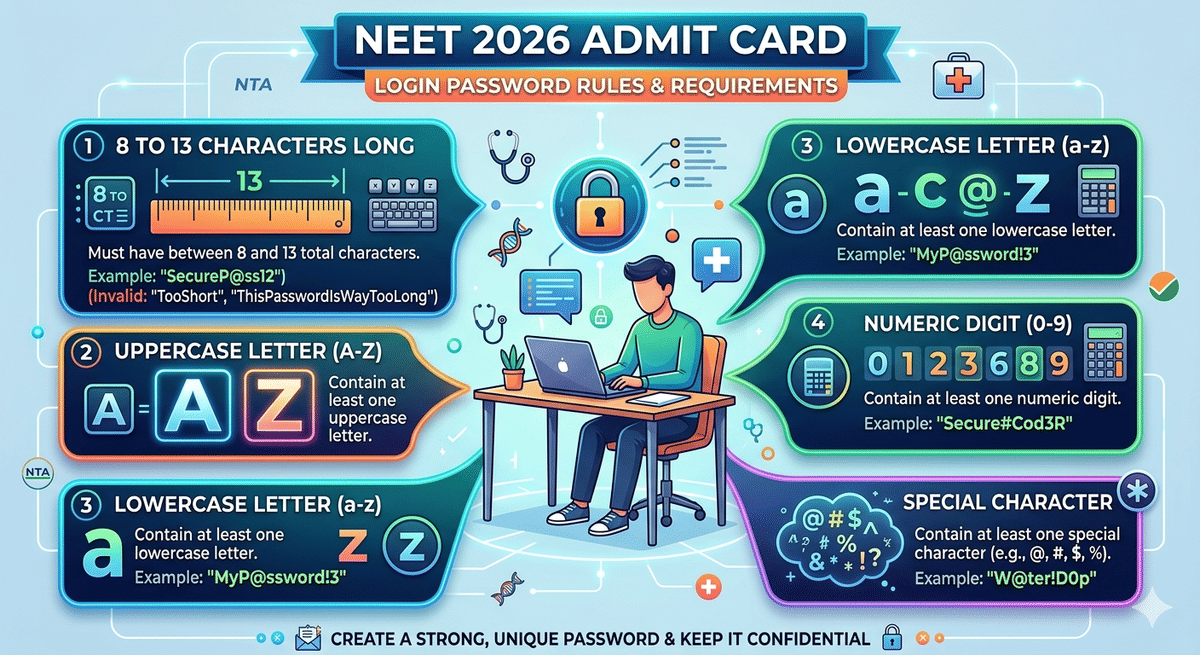
NEET 2026 Admit Card Login Password Rules
The NEET UG 2026 official Information Bulletin clearly gives the password policy. Your NEET password must:
- be 8 to 13 characters long
- contain at least one uppercase letter
- contain at least one lowercase letter
- contain at least one numeric digit
- contain at least one special character
How to Reset NEET 2026 Admit Card Login Password?
If you forget your NEET 2026 Admit Card Login password, NTA provides official reset options. You can reset the NEET 2026 Admit Card Login password using:
- The security question and answer selected during form filling
- a verification code sent by SMS or email
- A reset link was sent to the registered email address
NEET 2026 Admit Card Login FAQs
Ques: Is the NEET 2026 admit card released?
Ans: No, the NEET 2026 admit card has not been released yet. The National Testing Agency (NTA) is expected to release the admit card in the last week of April 2026. The exam is scheduled for May 3, 2026, and the admit card will be available on the official website: neet.nta.nic.in.
Ques: What to Do If NEET Admit Card 2026 Is Not Downloading?
Ans: This is not an uncommon issue. Many students appearing for the NEET exam face it every year and there are scores of emails to the NTA. However, before stressing or panicking, try these tips if your NEET admit is not downloading:
- Clear your browser cache and cookies
- Use a different browser or device
- Check your internet connection
- Attempt re-login during non-peak hours, which are mostly early morning or late night.
Ques: Can we re-download the NEET admit card?
Ans: Absolutely. In case you lose your admit card or need another copy for some reason, you can always go back to the website and download the admit card. There is no maximum download limit set by NTA; you can get it as many times as you want.
Ques: What should I do if my photo or signature is wrong on the NEET UG 2026 admit card?
Ans: You should immediately contact NTA through the help line or official email. You can still appear for the exam, and corrections will be handled later.



Comments